IT|EN
PAC SOFTWARE

Synchronize WooCommerce taxonomies with Claris FileMaker

PAC Taxonomy Bridge keeps WooCommerce product categories, global attributes and attribute values synchronized with Claris FileMaker in real time, reducing duplicated work and keeping your catalog structure under control

WHAT IT SOLVES

Keep your catalog structure under control

PAC Taxonomy Bridge eliminates repetitive synchronization work and keeps WooCommerce taxonomy changes connected directly to your FileMaker workflows

Duplicated maintenance

Avoid maintaining categories, attributes and attribute values separately in WooCommerce and FileMaker.

Polling & delay

No cron-based polling or scheduled checks. FileMaker is notified immediately when supported taxonomy data changes

Unnecessary middleware

Connect WooCommerce directly to FileMaker through the Data API, with no external synchronization service in between.

HOW IT WORKS

A cleaner workflow for structured catalog data.

From a WooCommerce taxonomy change to your FileMaker business logic in real time.

1

Taxonomy change

A product category, global attribute or attribute value is created, updated or deleted in WooCommerce.

2

PAC Taxonomy Bridge

Captures the WooCommerce object ID together with its taxonomy scope.

3

FileMaker Data API

Opens a secure Data API session and executes the configured FileMaker script.

4

FileMaker logic

Your script receives the object ID and taxonomy scope and applies your own synchronization or business logic.

CORE FEATURES (FREE VERSION)

Everything you need for a solid taxonomy connection.

The free version includes al the essential features to connect WooCommerce with Claris FileMaker using the FileMaker Data API.

Secure Data API connection

Connect to Claris FileMaker using the Data API.

Authentication & session handling

Manage authentication and session tokens automatically.

Connection test

Test your connection and verify settings directly in WordPress.

Encrypted credentials

Store your FileMaker credentials securely in WordPress.

Categories, attributes & values

Handle WooCommerce product categories, global product attributes and attribute values in real time.

PROFESSIONAL FEATURES

Advanced control for structured WooCommerce workflows

The Professional edition adds independent FileMaker destinations, reliable background delivery and advanced tools for production-ready taxonomy synchronization.

Independent taxonomy destinations

Configure a different FileMaker destination for Product Categories, Global Attributes and Attribute Values.

Separate database, layout & script

Each taxonomy scope can use its own FileMaker database, layout and script.

Independent FileMaker workflows

Process categories, attributes and values with completely different FileMaker logic when required.

Background delivery

Process taxonomy changes asynchronously using Action Scheduler for better performance and reliability.

Automatic retry

Automatically retry failed deliveries when temporary communication problems occur.

Custom HTTPS verification

Use advanced certificate verification options for custom FileMaker Server environments.

Custom CA certificate support

Support custom certificate authorities and private or self-managed certificate chains.

Advanced diagnostics

Inspect detailed FileMaker tests and responses to troubleshoot connection and script execution problems.

FREE VS PROFESSIONAL

Choose the right version for your needs.

Start with the free version or unlock the full power with Professional.

More than a connection. A complete integration solution.

The Professional version gives you the tools you need for reliable, scalable and production-ready workflows.

Feature
Free
Professional
FileMaker Data API connection
√
√
Authentication & session handling
√
√
Connection, script and end-to-end order tests
√
√
HTTPS with certificate verification
√
√
Encrypted FileMaker password storage
√
√
WooCommerce HPOS compatibility
√
√
Automatic trigger on payment completion
√
√
Additional WooCommerce triggers
-
√
FileMaker script execution
√
√
Order ID passed as script parameter
√
√
JSON and custom payloads
-
√
Background delivery
-
√
Automatic retries after failed deliveries
-
√
Manual resend
-
√
Custom CA certificate chains
-
√
Advanced diagnostics
-
√
A REAL WORKFLOW

From taxonomy change to structured FileMaker data.

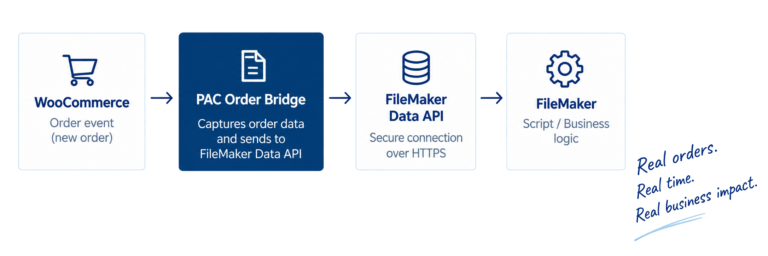
A real-world example of how PAC Taxonomy Bridge keeps WooCommerce catalog structures connected to FileMaker.

WooCommerce taxonomy change

A category, global attribute or attribute value is created, updated or deleted.

PAC Taxonomy Bridge

Captures the WooCommerce object ID and identifies the taxonomy scope.

FileMaker script

Executes the configured FileMaker script and passes the event information.

FileMaker Business logic

Creates, updates or deletes records and maintains your own relationships and catalog structure.

Consistent catalog data

WooCommerce and FileMaker remain aligned without polling or duplicated maintenance.

TECHNOLOGY & CAPABILITIES

Our expertise. Your possibilities.

FileMaker

WordPress

WooCommerce

RestAPIs

Webhooks

Databases

Automations