Contact

Home › PAC Software › PAC Taxonomy Bridge for WooCommerce › Documentation

PAC SOFTWARE DOCS

PAC Taxonomy Bridge for WooCommerce

Technical documentation for real-time WooCommerce product taxonomy notifications to Claris FileMaker through the FileMaker Data API.

Free 1.0.4 • Professional settings verified on 1.0.1 • Documentation updated Oct 2026

WooCommerce taxonomy event

A category, attribute or attribute value changes

PAC Taxonomy Bridge

Identifies the object and scope

FileMaker Data API

Authenticates and executes the script

FileMaker script

Applies your synchronization logic


1. Overview

PAC Taxonomy Bridge for WooCommerce notifies Claris FileMaker when supported WooCommerce taxonomy objects are created, updated or deleted. It covers product categories, global product attributes and the terms used as values of global attributes.

Free uses one FileMaker database, layout and script for all three scopes. The script receives compact JSON containing the WooCommerce object ID and taxonomy scope, such as {"id":37,"ambito":"categoria"}.

Professional shares one connection, database and layout, then automatically selects a dedicated Category, Attribute or Attribute Value script. It also adds licensed delivery controls, retries, custom certificate verification and diagnostics.

WordPress connects directly to the configured FileMaker Server. FileMaker does not need to poll WooCommerce. Your FileMaker solution remains responsible for retrieving additional data and deciding how records and workflows are handled.

Taxonomy changes. Direct delivery. Your business logic.

React to supported WooCommerce taxonomy changes without catalog polling or external synchronization middleware.


2. Key benefits

Real-time notifications

Send supported category, global attribute and attribute-value changes when they occur.

Compact Free parameter

Receive the object ID and scope, then retrieve only the data your workflow needs.

Scope-specific scripts

Route the three scopes to dedicated FileMaker scripts with Professional.

Direct integration

Connect WordPress to the FileMaker Data API without middleware.


3. How it works

PAC Taxonomy Bridge uses WooCommerce and WordPress hooks to detect supported taxonomy events and calls the FileMaker Data API to execute the appropriate script.

WooCommerce

Taxonomy event

PAC Taxonomy Bridge

Identifies the scope and selects the destination

FileMaker Data API

Executes the configured script

FileMaker script

Runs your business logic

Typical flow:

1

A supported category, global attribute or attribute-value event occurs in WooCommerce.

2

PAC Taxonomy Bridge identifies the object ID and taxonomy scope.

3

Free prepares compact id and ambito JSON; Professional selects the database, layout and script configured for that scope.

4

The plugin opens a FileMaker Data API session and executes the selected script in its layout context.

5

The FileMaker script reads Get ( ScriptParameter ), runs the integration logic and returns the result recorded by the bridge.

You remain in control.

The FileMaker-side logic is entirely under your control. PAC Taxonomy Bridge delivers the notification; it does not create tables, map fields or impose a record structure.


4. Requirements

To use PAC Taxonomy Bridge for WooCommerce, you need the following components:

WordPress 6.4 or later and PHP 7.4 or later

WooCommerce installed and active

PHP Sodium or OpenSSL AES-256-GCM support for saved-password encryption

FileMaker Server with the Data API enabled and reachable over HTTPS

A FileMaker account with fmrest and access to the required file, layouts and scripts

A target layout and receiving script configured for the installed edition’s parameter contract

A working WooCommerce Action Scheduler runner for Professional background delivery and retries


5. Installation

Install PAC Taxonomy Bridge in WordPress, activate it with WooCommerce available, then configure and test the FileMaker connection before enabling automatic delivery.

1

Download

the plugin

2

Upload to

WordPress

3

Activate

the plugin

4

Configure

FileMaker destinations

5

Test

each taxonomy scope


6. Configuration

Open WooCommerce > Settings > Integrations > PAC Taxonomy Bridge for WooCommerce.

6.1 Connection settings

These are the shared settings used by PAC Taxonomy Bridge to connect WordPress directly to the FileMaker Data API.

Important: the values shown below are examples. Replace them with the connection details of your FileMaker environment.

Enable controls automatic taxonomy notifications. FileMaker Server is the HTTPS base URL without /fmi/data/ or a trailing slash. Data API version offers v1, v2 and vLatest and defaults to v1.

Use a dedicated FileMaker username and FileMaker password. Leave the password blank to retain the saved encrypted value. HTTP timeout applies to each request, accepts 5–120 seconds and defaults to 30 seconds; Free caps the logout request at 10 seconds.

Settings

Enable

✓

Enable PAC Taxonomy Bridge

On by default in Free. Tests remain available while automatic delivery is off.

FileMaker Server

https://fm.example.com

HTTPS base URL without /fmi/data/ or a trailing slash.

Data API version

v1

⌄

Available values: v1, v2 and vLatest. Default: v1.

FileMaker username

taxonomy_api

Use a dedicated account with fmrest and only the required privileges.

FileMaker password

••••••••••••

Stored encrypted. Leave the field blank to retain the saved password.

HTTP timeout

30

⌃

⌄

Accepted range: 5–120 seconds. Free caps logout at 10 seconds.

Free configuration constants

In the Free edition, these wp-config.php constants override the corresponding saved connection values.

Constant

Overrides

PAC_TAXONOMY_BRIDGE_FM_HOST

Server

PAC_TAXONOMY_BRIDGE_FM_API_VERSION

Data API version

PAC_TAXONOMY_BRIDGE_FM_USERNAME

Username

PAC_TAXONOMY_BRIDGE_FM_PASSWORD

Password

PAC_TAXONOMY_BRIDGE_FM_TIMEOUT

Timeout

6.2 FileMaker destinations

From version 1.0.2, Professional can assign an independent FileMaker database, layout and script to each taxonomy scope while all destinations use the same Data API connection credentials.

Configure a complete destination for Product Category, Global Attribute and Attribute Value. Each destination contains its own Database, Layout and Script values. PAC Taxonomy Bridge selects the correct group automatically from the taxonomy scope before making the FileMaker Data API request.

If every scope belongs to the same FileMaker solution, repeat the same Database and Layout values and use the appropriate entry script in each group.

FileMaker destination example

Professional

Database

Catalog

Exact name of the hosted FileMaker database for this scope. Repeat the value in other scope groups when they share the same file.

Layout

Taxonomy_API

Layout context for this scope’s FileMaker script. It may differ from the layouts used by the other scopes.

Category script

taxonomy_category

Receives product-category notifications.

Attribute script

taxonomy_attribute

Receives global product-attribute notifications.

Attribute Value script

taxonomy_attribute_value

Receives global attribute-value notifications.

Automatic scope routing

The taxonomy scope selects the complete destination before the Data API request is made: Database, Layout and Script. The three routes may point to the same FileMaker solution or to independent solutions.

Scope

Selected field

Default shown

categoria

Category script

taxonomy_category

attributo

Attribute script

taxonomy_attribute

valore_attributo

Attribute Value script

taxonomy_attribute_value

Free edition

Free uses one Database, Layout and Script for every supported scope. The shared script receives compact JSON containing id and ambito. Free destination constants are PAC_TAXONOMY_BRIDGE_FM_DATABASE, PAC_TAXONOMY_BRIDGE_FM_LAYOUT and PAC_TAXONOMY_BRIDGE_FM_SCRIPT.

6.3 Supported events and script.param

The main Enable setting controls every automatic notification. PAC Taxonomy Bridge listens for create, update and delete operations on the three supported WooCommerce taxonomy scopes and routes each notification according to its scope.

Scope

Create

Update

Delete

ambito

Product category

created_product_cat

edited_product_cat

delete_product_cat

categoria

Global attribute

woocommerce_attribute_added

woocommerce_attribute_updated

woocommerce_attribute_deleted

attributo

Global attribute value

created_term on pa_

edited_term on pa_

delete_term on pa_

valore_attributo

Local attributes stored only on an individual product are outside this event set.

Free script.param

Free sends compact JSON containing only the WooCommerce object ID and its taxonomy scope.

Category

{"id":37,"ambito":"categoria"}

Attribute

{"id":4,"ambito":"attributo"}

Attribute value

{"id":91,"ambito":"valore_attributo"}

The parameter does not include the operation or the complete object. A deleted object may no longer be retrievable, so the receiving FileMaker workflow should retain enough identity to reconcile deletions from id and ambito.

6.4 Professional delivery and retries

Professional can deliver taxonomy notifications during the current request or queue them through WooCommerce Action Scheduler. Automatic retries help recover from temporary FileMaker or network failures.

Delivery

Delivery mode

Immediate ▾
Background with Action Scheduler

Select whether the Data API request runs immediately or is processed by the background queue.

Automatic retry attempts

3

Maximum number of automatic attempts after a temporary delivery failure.

Immediate

The plugin calls FileMaker as part of the WooCommerce request. The latest result is available immediately in the stored communication status.

Background with Action Scheduler

The notification is placed in the WooCommerce queue and processed separately. Action Scheduler must be running normally for queued deliveries and retries to complete.

FileMaker scripts should be safe to run more than once. A retry can repeat a delivery whose first response was interrupted after FileMaker had already processed it.

6.5 Certificate verification

Certificate verification controls how WordPress validates the HTTPS identity of FileMaker Server. Keep verification enabled in production and use a custom CA only when the server certificate chain requires it.

HTTPS verification

Certificate verification

On — verify with public CA bundle ▾

Professional provides public-CA, custom-CA and encryption-only modes. Free verifies with an available public CA bundle.

Custom CA certificate

PEM certificate text or a readable PEM file path. Used only when Custom verification is selected.

Mode

Behavior

On — public CA bundle

Verifies the certificate chain and hostname against the public CA bundle. This is the verified default.

Custom — custom CA

Uses the PEM certificate or readable PEM path supplied in the Custom CA certificate field.

Off — HTTPS encryption only

Keeps HTTPS encryption but disables certificate identity verification. Reserve this mode for controlled troubleshooting.

Never publish private certificate material. The custom field must contain only the CA certificate needed to verify FileMaker Server, not a server private key.

6.6 Diagnostics and testing

Use the built-in controls to verify the Data API connection, exercise the complete taxonomy path and inspect the exact FileMaker response. Tests use the values currently shown in the settings form.

Test and diagnostics

Last communication

No communication recorded yet.

Clear status

Connection test

Test connection

WooCommerce test ID

Enter the ID of an existing category, global attribute or attribute value.

Test scope

Category ▾

End-to-end taxonomy test

Send taxonomy test

Diagnostics

Plugin version
Licensed runtime features
WordPress · WooCommerce · PHP versions
Encryption backend
FileMaker destination selected for the scope
Database · Layout · Script · Sent parameter
Response code · scriptError · scriptResult
Delivery mode · Last status · Last object ID

Copy this block when support needs the runtime configuration and the latest FileMaker test result. Review it before sharing because it can identify internal destinations.

Cleanup on uninstall

Remove plugin settings and runtime data when the plugin is deleted

Connection test

Authenticates with FileMaker Server and verifies that the configured database can be reached. It does not run a taxonomy script.

End-to-end taxonomy test

Select Category, Attribute or Attribute Value and enter a known WooCommerce ID. Professional routes the request to that scope’s configured database, layout and script.

Recommended order: save the destination settings; test the connection; send one known ID for each configured scope; inspect response code, scriptError and scriptResult; verify the resulting FileMaker data; then enable controlled live changes.


7. Free vs Professional

Choose the edition that matches the workflow. Both editions connect directly to FileMaker and leave validation, record matching and business logic inside your FileMaker solution. Professional adds scope-specific routing and the delivery controls needed for more demanding production workflows.

Feature

Free

Professional

Three supported taxonomy scopes

✓

✓

Create, update and delete hooks

✓

✓

Direct FileMaker Data API connection

✓

✓

FileMaker authentication and session handling

✓

✓

One shared database and layout

✓

✓

Enable or disable automatic notifications

✓

✓

Configurable HTTP timeout

✓

✓

Immediate delivery

✓

✓

Public certificate verification

✓

✓

Encrypted FileMaker password storage

✓

✓

Connection test

✓

✓

End-to-end taxonomy test

✓

✓

Latest communication status

✓

✓

Cleanup on uninstall

✓

✓

Compact id + ambito JSON parameter

✓

—

One shared receiving script for all scopes

✓

—

Dedicated script for each scope

—

✓

Automatic scope-based script routing

—

✓

Configurable delivery mode

—

✓

Automatic retries

—

✓

Configurable retry attempts

—

✓

Custom verification / custom CA

—

✓

Freemius license status

—

✓

Professional event_json payload mode

—

✓

Advanced diagnostics

—

✓

The editions differ primarily in script routing, delivery controls, retries, certificate options and diagnostics. The Free parameter contract is documented in section 6.3. Professional reports event_json as its payload mode, but fields not confirmed by the verified build are intentionally not asserted here.


8. Professional features

The Professional edition of PAC Taxonomy Bridge adds licensed controls for scope-specific routing, delivery recovery, certificate handling and diagnostics.

Professional includes the Free capabilities.
It keeps one shared FileMaker connection, database and layout while adding separate Category, Attribute and Attribute Value scripts. Delivery controls, automatic retries, custom certificate verification and diagnostics support production use.

These options do not define the FileMaker schema or synchronize changes back to WooCommerce. The configured FileMaker scripts remain responsible for interpreting the parameter and applying business logic.

Scope-specific scripts

Automatically select the Category, Attribute or Attribute Value script for the matching taxonomy scope.

Delivery mode

Use the licensed delivery controls available in the installed Professional build; Immediate is shown in the verified settings.

Automatic retries

Retry eligible temporary FileMaker or network failures using the configured attempt controls.

Custom certificate handling

Choose the available verification policy and provide a custom CA certificate when required.

License status

Freemius authorizes Professional runtime features for the current installation.

Advanced diagnostics

Inspect plugin, runtime, connection, destination and last-delivery information.


9. FileMaker side implementation

On your FileMaker Server, prepare the receiving scripts that PAC Taxonomy Bridge will execute for category, global attribute and attribute-value notifications.

The steps below describe a typical implementation pattern, not a mandatory FileMaker architecture.

PAC Taxonomy Bridge does not create FileMaker records, map fields or impose a database schema. It authenticates through the FileMaker Data API, executes the configured script in the selected layout context and passes JSON through script.param.

Free sends one compact contract to a single script: id identifies the WooCommerce object and ambito identifies categoria, attributo or valore_attributo. Professional automatically uses the configured script for the matching scope. Your FileMaker solution validates the parameter, retrieves any additional WooCommerce data that is still available and applies its own repeat-safe business logic.

1

Create a dedicated integration account

Use fmrest and grant only the file, layout and script privileges required by the taxonomy integration.

2

Enable the Data API

Enable Data API access for the hosted file and make FileMaker Server reachable from WordPress over HTTPS.

3

Prepare the target layout and scripts

Provide a stable layout context and configure the single Free script or the three Professional scope scripts.

4

Read and validate script.param

Use Get ( ScriptParameter ) and parse the JSON id and ambito values.

5

Resolve the taxonomy scope

Accept only categoria, attributo or valore_attributo and route the matching workflow.

6

Apply repeat-safe business logic

Match records by stable WooCommerce ID and scope, then create, update or archive according to FileMaker rules.

Example FileMaker script flow (pseudo code)

# Receive the JSON parameter sent by PAC Taxonomy Bridge
Set Variable [ $parameter ; Value: Get ( ScriptParameter ) ]
Set Variable [ $id ; Value: JSONGetElement ( $parameter ; "id" ) ]
Set Variable [ $scope ; Value: JSONGetElement ( $parameter ; "ambito" ) ]

# Require a positive integer ID
# Accept only categoria, attributo or valore_attributo
# Route to the appropriate taxonomy workflow
# Retrieve current WooCommerce data when available
# Do not infer create/update/delete from the Free parameter
# Match records by stable ID and scope
# Apply repeat-safe business rules

The bridge treats a non-zero FileMaker scriptError as a failed delivery.

FILEMAKER-SIDE RESPONSIBILITY

Your FileMaker solution defines the data model and outcome.
PAC Taxonomy Bridge supplies the notification and executes the configured script. FileMaker remains responsible for validating identity and scope, retaining enough identity to reconcile deletion events, retrieving additional data when available and deciding whether to create, update, archive or trigger downstream workflows.


10. Real-world example

Here is a typical workflow from a supported WooCommerce taxonomy change to an updated catalog record in FileMaker.

This example shows one possible end-to-end workflow. Only the notification and execution of the configured FileMaker script are performed by PAC Taxonomy Bridge.

After the script starts, validation, data retrieval, record matching and downstream processing belong to your FileMaker solution. Free supplies the object ID and scope to the shared script; Professional routes the matching scope to its configured script.

Other workflows are equally valid: the plugin does not require a specific FileMaker schema or field mapping.

Taxonomy change

A category, global attribute or global attribute value changes in WooCommerce.

Bridge notification

The bridge sends compact ID-and-scope JSON or routes the scope to its Professional script.

Validate identity and scope

FileMaker validates the positive ID and the supported ambito value.

Retrieve required data

The workflow obtains current WooCommerce fields when the object is still available.

Update the catalog

FileMaker matches stable IDs and applies its own repeat-safe record logic.

This is an example architecture, not automatic field mapping supplied by the plugin.


11. Security and reliability

PAC Taxonomy Bridge is built with security and reliability in mind, using the FileMaker Data API for direct, encrypted communication.

PAC Taxonomy Bridge communicates directly between your WordPress/WooCommerce server and the FileMaker Server configured by the administrator. PAC Age does not proxy the FileMaker connection and no third-party middleware is required.

The Free edition includes HTTPS certificate verification, encrypted FileMaker password storage, response validation and a short-lived lock against concurrent delivery of the same ID and scope. Professional adds production-oriented controls such as background delivery, automatic retries, custom certificate verification, custom CA support and diagnostics.

FileMaker writes should remain idempotent because later events and Professional retries can legitimately process the same taxonomy object again.

HTTPS

Use HTTPS and a certificate trusted by the selected verification policy.

Least privilege

Restrict the FileMaker Data API account to the required file, layout and taxonomy scripts.

Encrypted password

Free encrypts the stored password with libsodium or OpenSSL AES-256-GCM using a key derived from the WordPress authentication salt.

Response validation

Free validates HTTP status, FileMaker Data API codes and scriptError, and attempts to close the session.

Repeat safety

The Free lock prevents concurrent sends only. Make FileMaker writes idempotent for later events and Professional retries.

Direct route

Delivery goes to the configured FileMaker Server; PAC Age does not receive or proxy taxonomy data.

Direct connection. No middleware.

PAC Taxonomy Bridge calls the FileMaker Data API directly from your WordPress server. No PAC Age server, external synchronization platform or catalog polling service is involved.


12. Troubleshooting

Find solutions to common connection, delivery and FileMaker-side integration issues.

Cannot connect to FileMaker

First run Test connection from the PAC Taxonomy Bridge settings page.

Verify that the FileMaker Server URL is correct and reachable from the WordPress server over HTTPS, that the FileMaker Data API is enabled, and that the configured database is open.

Also check the database name, FileMaker account and password. The account must have the fmrest extended privilege and sufficient access to the configured file, layout and scripts.

If the connection works from another computer but fails from WordPress, also check firewall rules, DNS resolution and whether FileMaker Server is reachable from the web server itself.

HTTPS or certificate error

PAC Taxonomy Bridge connects to FileMaker Server over HTTPS and verifies the server certificate.

Make sure the certificate is valid, has not expired and matches the hostname configured for FileMaker Server.

If FileMaker Server uses a certificate issued by a private or internal CA, Professional can use the configured custom CA certificate. Verify both the selected certificate verification mode and the saved CA certificate against the installed Taxonomy build.

If the certificate works from another computer but fails from WordPress, also verify that the complete trust chain is available to the web server.

Authentication or password failure

An authentication failure means that FileMaker Server was reached but rejected the supplied credentials.

Verify the FileMaker username and password, the fmrest extended privilege, and access to the configured database, layout and relevant script or scripts.

If credentials are defined by an overriding configuration constant, confirm that its value is current. After changing the FileMaker password or the WordPress security salts, enter and save the password again before repeating the test.

Script not found or scriptError is non-zero

Check that the database, layout and script names exactly match those in FileMaker. Script names are case-sensitive and must belong to the configured database.

Verify that the FileMaker account can access the selected layout and run the required script. Free uses the single configured script; Professional selects the Category, Attribute or Attribute Value script according to the taxonomy scope.

If a script was renamed, update and save the bridge settings, then run the script test again. A non-zero scriptError must be investigated in the corresponding FileMaker script.

A taxonomy object is not sent

First check that PAC Taxonomy Bridge is enabled and that all connection and script settings have been saved. Review Last communication, then run the connection and end-to-end taxonomy tests.

Confirm that the change occurred through a supported WooCommerce taxonomy action. Categories, global attributes and global attribute values are supported; an attribute value must be a term of a global taxonomy whose name begins with pa_.

Code that writes directly to the database or otherwise bypasses the supported WordPress and WooCommerce hooks may not notify the bridge.

A deleted object cannot be retrieved

After a category, attribute or attribute value has been deleted, WooCommerce may no longer be able to return the original object data.

The notification still provides the stable WooCommerce ID and taxonomy scope. Use those values in FileMaker to find and archive, deactivate or reconcile the corresponding record without requiring a successful lookup of the deleted WooCommerce object.

FileMaker should therefore store both the WooCommerce ID and the scope for every synchronized taxonomy record.

An unrelated test ID succeeds

The end-to-end taxonomy test validates that the entered ID is positive and that the selected scope is supported. It does not confirm that the ID belongs to an existing category, global attribute or attribute value.

Use the ID of a known WooCommerce taxonomy object, select the matching scope and then verify the result in FileMaker. A successful request with an unrelated ID proves only that the delivery path and script execution completed.

A notification is processed twice

The Free edition uses a short-lived lock to prevent concurrent delivery of the same WooCommerce ID and taxonomy scope. This lock is not a permanent history of processed notifications.

Later events for the same object can be sent again, and Professional retries may repeat a delivery after a temporary failure. FileMaker processing should therefore be idempotent: use the WooCommerce ID together with the taxonomy scope to update the existing record safely instead of creating an unintended duplicate.


13. FAQ

Answers to the most common questions about PAC Taxonomy Bridge for WooCommerce.

Which objects are supported?

PAC Taxonomy Bridge supports product categories, global product attributes and the terms used as values in global attribute taxonomies.

For attribute values, the term must belong to a WooCommerce global attribute taxonomy whose name begins with pa_. The bridge sends the appropriate taxonomy scope so that FileMaker can process each type through the configured workflow.

Are local product attributes supported?

No dedicated event is documented for attributes stored only on an individual product.

PAC Taxonomy Bridge monitors WooCommerce global attributes and the terms belonging to their pa_ taxonomies. A local attribute exists only inside one product and is not managed as an independent global taxonomy object.

Product-specific data should be handled by the appropriate product workflow rather than treated as a Taxonomy Bridge event.

What does Free send?

The Free edition passes a compact JSON object through script.param. It contains the WooCommerce object ID and its taxonomy scope, for example:

{"id":55,"ambito":"categoria"}

The supported scope values are categoria, attributo and valore_attributo. Free does not send the complete taxonomy object; the FileMaker script decides how to use the ID and scope.

Does Free identify the operation?

No. In the Free edition, create, update and delete hooks use the same compact contract containing only id and ambito.

The FileMaker workflow must decide how to reconcile the received object. For a deleted object, WooCommerce may no longer return its original data, so FileMaker should use the stored ID and scope to archive, deactivate or reconcile the corresponding record.

Can each scope use a different FileMaker file?

The verified Professional settings use one shared FileMaker Server connection, database and layout for all taxonomy scopes.

Professional provides separate script settings for Category, Attribute and Attribute Value, and automatically selects the correct script for the object being sent. The current settings do not provide a separate database or layout for each scope.

Does it require middleware or polling?

No.

PAC Taxonomy Bridge sends requests directly from the WordPress/WooCommerce server to the FileMaker Server configured by the administrator through the standard FileMaker Data API.

No Zapier, n8n, catalog polling service or PAC Age intermediary server is required. Immediate delivery reacts to supported taxonomy changes; Professional background delivery still requires WordPress scheduled actions to run correctly.

Is it two-way synchronization?

No. The documented direction is from WooCommerce to FileMaker: when a supported taxonomy change occurs, the bridge executes the configured FileMaker script and passes the notification through script.param.

Sending categories, attributes or attribute values from FileMaker back to WooCommerce is a separate integration workflow and is not performed automatically by PAC Taxonomy Bridge.

Does it require a FileMaker plug-in?

No.

PAC Taxonomy Bridge uses the standard FileMaker Data API to authenticate with FileMaker Server and execute the configured script. No FileMaker plug-in is required.

The FileMaker Data API must be enabled, and the configured FileMaker account must have the fmrest extended privilege and sufficient access to the selected database, layout and scripts.


14. Changelog

Version 1.0.4

WordPress.org translation-handling and documentation updates; no functional taxonomy-delivery change.

Version 1.0.3

Detailed FileMaker test diagnostics and improved Free end-to-end testing.

Professional settings reference 1.0.1

Shared connection, three scripts, delivery mode, retries, certificate controls, tests and diagnostics.

Version 1.0.1

Help tooltips, select fix, aligned field sizing and improved Italian admin descriptions.

Version 1.0.0

Initial release.


Need help?

Use diagnostics and tests first. For a custom FileMaker workflow, contact PAC Age.

Contact PAC Age

PAC Taxonomy Bridge for WooCommerce · Technical documentation

PAC Taxonomy Bridge Professional

Use separate FileMaker scripts for categories, attributes and attribute values, with background delivery, retries and diagnostics.

View Professional → Free plugin →

Documentation scope

This guide covers the current Free plugin and the Professional settings verified from the installed Taxonomy Bridge interface. Check the version note at the top of the page when comparing a later release.
GESTIONE ANAGRAFICHE

Acquirenti e proprietari

eZ-Domus gestisce le anagrafiche delle persone e delle aziende che entrano in relazione con l’agenzia. Le schede collegano dati anagrafici, contatti, immobili, richieste, visite, incarichi, proposte, affitti, documenti e storico, così ogni informazione rimane disponibile nel contesto corretto.

Acquirenti: dalla richiesta all’immobile

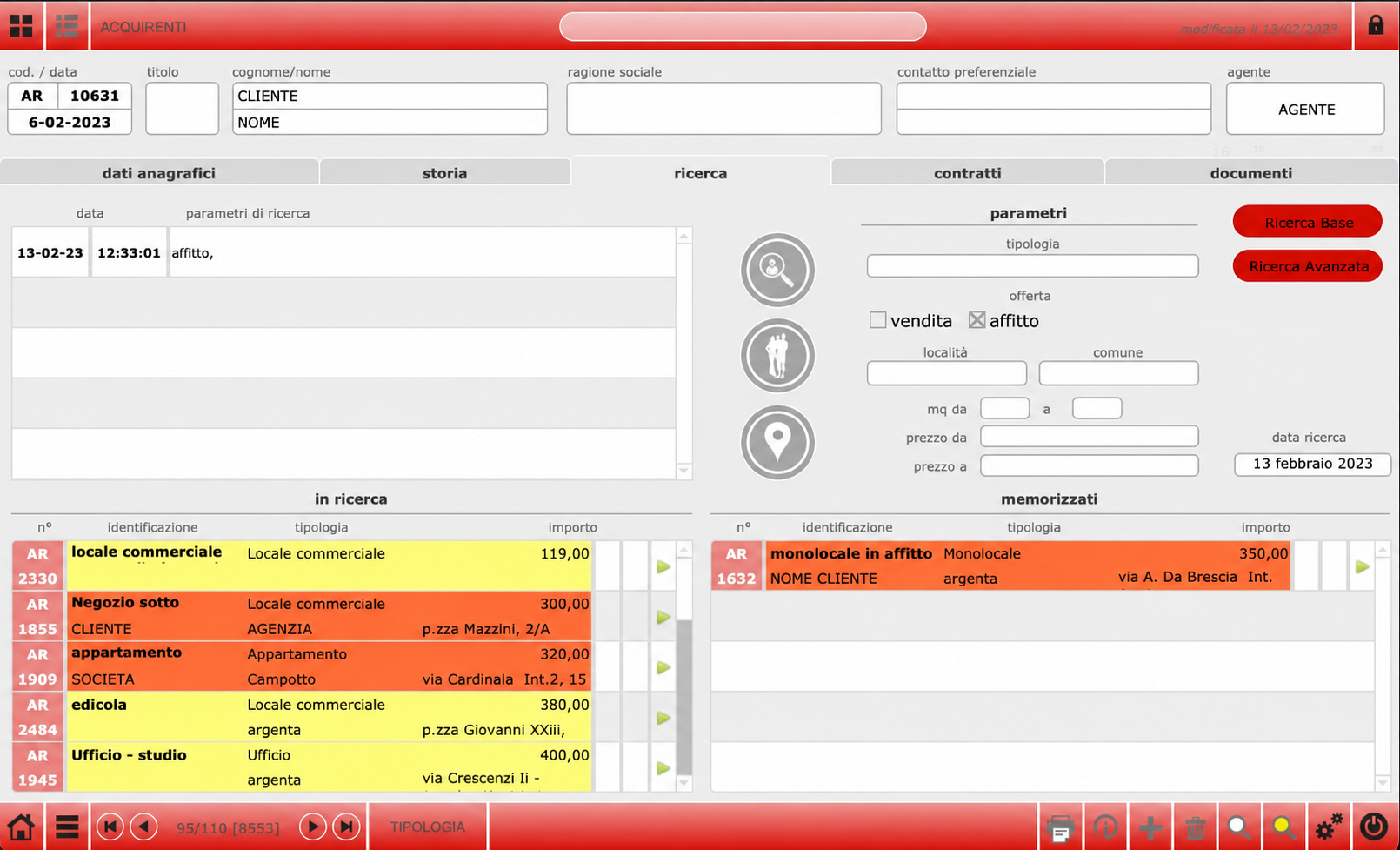
La scheda Acquirenti raccoglie i dati della persona o della società, i riferimenti di contatto e l’agente incaricato. Dalla stessa anagrafica si possono consultare le richieste immobiliari e le ricerche salvate, con tipologia, offerta (vendita o affitto), località, comune, superficie, fasce di prezzo e data della ricerca.

Dati anagrafici e contatti

La scheda comprende domicilio o sede legale, eventuale sede operativa, codice fiscale e partita IVA, dati del documento, informazioni di nascita, sesso e stato civile. Sono disponibili aree dedicate a contatti, banche, note, motivo della richiesta, valutazione e altre informazioni operative.

Ricerca e matching

La sezione Ricerca permette di impostare i parametri della richiesta e di distinguere le ricerche in corso da quelle memorizzate. Gli immobili compatibili possono essere individuati e collegati alla domanda, mantenendo visibili tipologia, importo e riferimenti principali.

Acquirenti
Imposta ricerche immobiliari dettagliate per tipologia, zona, superficie, prezzo e offerta, quindi confronta gli immobili individuati e quelli già memorizzati.

Visite, storico e contratti

Le visite riportano data, ora, immobile, acquirente e note. Lo storico conserva le attività già registrate; nelle sezioni Contratti sono organizzate proposte e affitti, con codici, date, stati, accettazioni, offerte e note o richieste.

Documenti e note

La scheda include anche l’area Documenti per associare file e informazioni operative all’anagrafica, mantenendo collegati i materiali utilizzati durante il rapporto con il cliente.

Proprietari: incarichi e immobili depositati

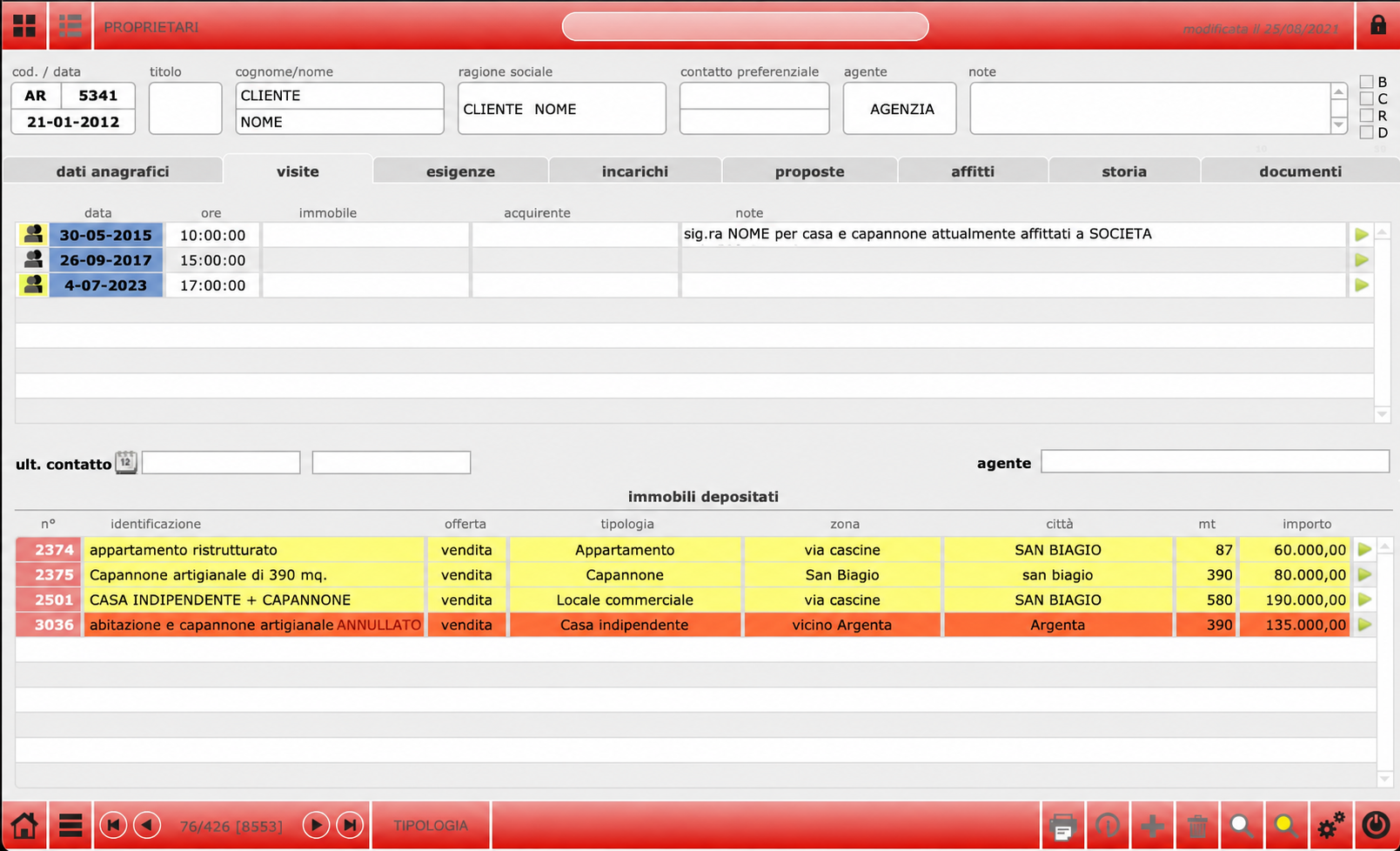
La scheda Proprietari è pensata per seguire il rapporto con chi affida uno o più immobili all’agenzia. Oltre ai dati anagrafici, ai contatti e alle note, raccoglie le attività e le relazioni commerciali legate agli immobili depositati.

Dati e relazioni

Sono disponibili domicilio o sede legale, sede operativa, informazioni fiscali e documentali, dati anagrafici, contatti, banche e note. Le informazioni restano associate all’anagrafica del proprietario e possono essere richiamate nelle attività collegate.

Visite, esigenze e incarichi

Le sezioni dedicate consentono di registrare visite, esigenze, incarichi e relative informazioni operative. In questo modo il lavoro svolto dall’agenzia rimane collegato alla persona e agli immobili di riferimento.

Proprietari
Gestisci visite, contatti e immobili affidati al proprietario, mantenendo sotto controllo incarichi, attività e storico delle relazioni.

Proposte, affitti e storico

Proposte e affitti sono organizzati in tabelle con codici, date, stato, immobile di riferimento, offerte e note o richieste. Lo storico conserva le informazioni sulle attività e sui contatti già registrati.

Immobili depositati

L’elenco degli immobili depositati riporta numero, identificazione, tipo di offerta, tipologia, zona, città, superficie e importo. Ogni riga permette di richiamare il relativo immobile e di mantenere il collegamento tra anagrafica e scheda immobiliare.

Documenti e continuità operativa

L’area Documenti completa la scheda con i file e le informazioni associate al proprietario. Tutti questi elementi restano raccolti nella stessa anagrafica, per avere una visione ordinata del rapporto e delle attività svolte.

Anagrafiche collegate al lavoro dell’agenzia

Acquirenti e proprietari non sono archivi isolati: sono collegati alle schede immobili, alle visite, alle richieste, agli incarichi, ai contratti e ai documenti. Questo permette di seguire ogni relazione partendo dalla persona oppure dall’immobile, senza perdere il contesto.

GESTIONE IMMOBILI

Immobili

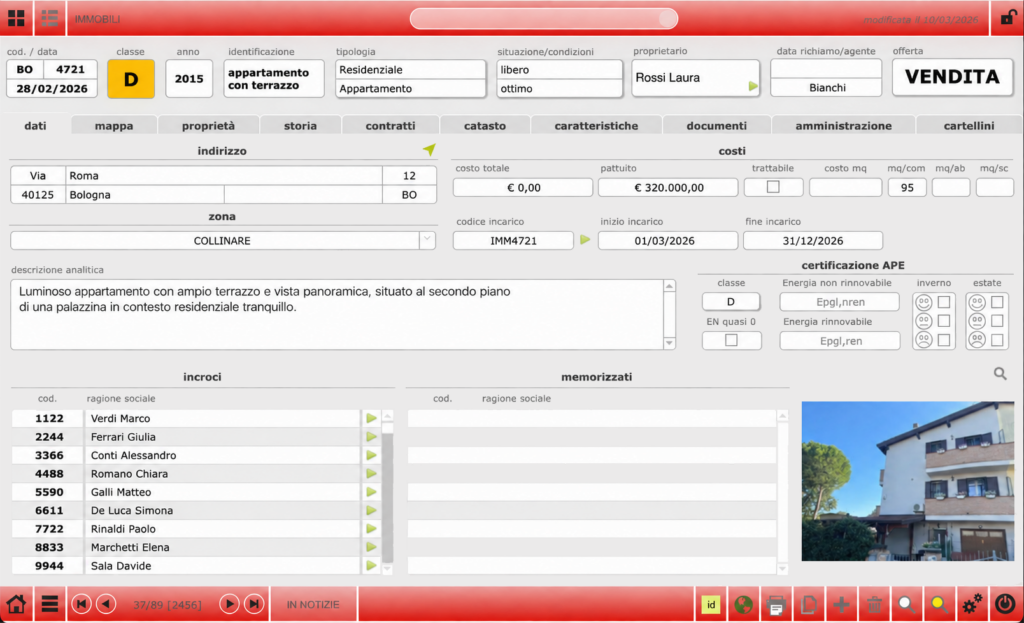
La scheda Immobili è il punto in cui l’agenzia raccoglie e organizza tutte le informazioni relative a un immobile. Non contiene soltanto i dati identificativi, ma collega tra loro indirizzo, descrizione, condizioni, costi, proprietari, clienti interessati, visite, documenti e attività commerciali.

Nella parte superiore sono sempre visibili le informazioni essenziali: codice e data, identificazione, tipologia, situazione e condizioni, proprietario, agente di riferimento e tipo di offerta. La sezione principale raccoglie inoltre indirizzo, zona, dati economici e informazioni sull’incarico, compresi costo totale, prezzo pattuito, trattabilità, valori al metro quadro e date dell’incarico. La descrizione analitica conserva il testo completo dell’immobile e l’area energetica raccoglie classe e relativi valori.

La scheda principale riunisce dati identificativi, indirizzo, costi, incarico, descrizione e certificazione energetica.

Relazioni e storico

La scheda mantiene i collegamenti con le persone e le attività che riguardano l’immobile. Nelle aree dedicate agli incroci e agli elementi memorizzati si possono visualizzare gli acquirenti che hanno mostrato interesse o che sono stati associati all’immobile. Da qui si può ricostruire il rapporto tra immobile, proprietari, clienti e attività già svolte dall’agenzia.

Le sezioni della scheda

Mappa

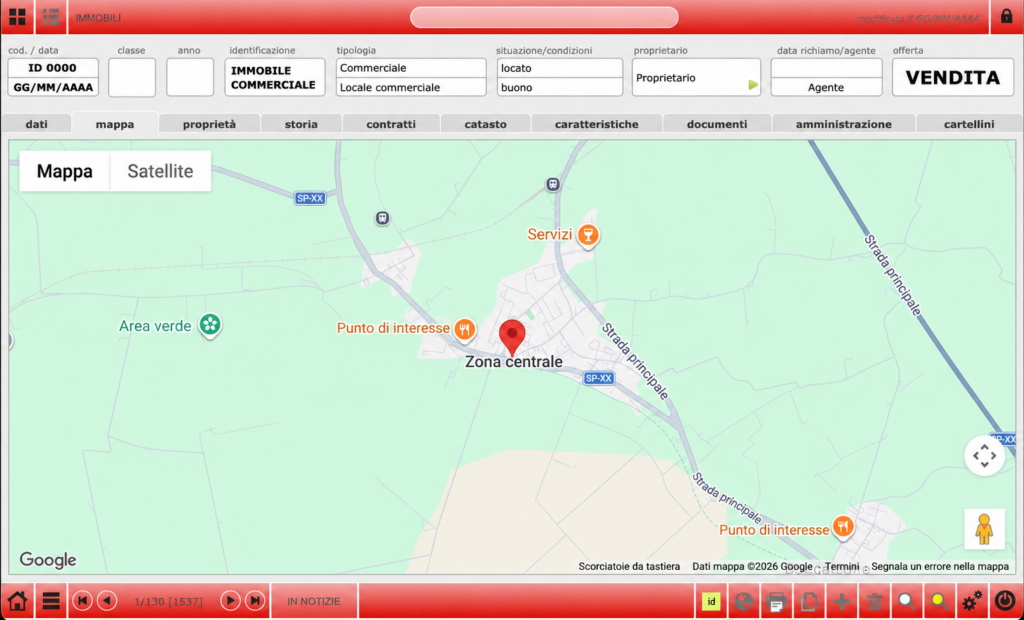
La scheda Mappa mostra la posizione dell’immobile e permette di alternare la visualizzazione stradale a quella satellitare, per avere un riferimento immediato della zona e del contesto.

Mappa interattiva basata su Google Maps, con esplorazione dell’area e accesso alla funzione Street View per visualizzare l’immobile e i dintorni.

Proprietà

La sezione Proprietà registra il tipo di documento o relazione, le date di inizio e fine, il proprietario principale, le eventuali quote e le note. Sono presenti anche campi riepilogativi relativi a serie e chiavi.

Storia

La sezione Storia conserva le visite effettuate sull’immobile. Per ogni visita sono riportati data, ora, cliente, descrizione e note, così da mantenere uno storico delle attività e delle informazioni raccolte durante i contatti con i potenziali interessati.

Contratti

La sezione Contratti distingue le proposte dagli affitti. Per le proposte sono disponibili codice, data, accettazione del proprietario, accettazione del cliente, stato, offerta, note e richieste. Per gli affitti vengono gestiti codice, periodo, stato, affittuario e note.

Catasto

La sezione Catasto raccoglie i riferimenti della zona e del comune, insieme a foglio, mappale, subalterno, categoria, classe, consistenza, rendita, zona censuaria e note. Sono presenti aree separate per registrare agibilità e permessi, con numero, date, comune, tipo e annotazioni.

Caratteristiche

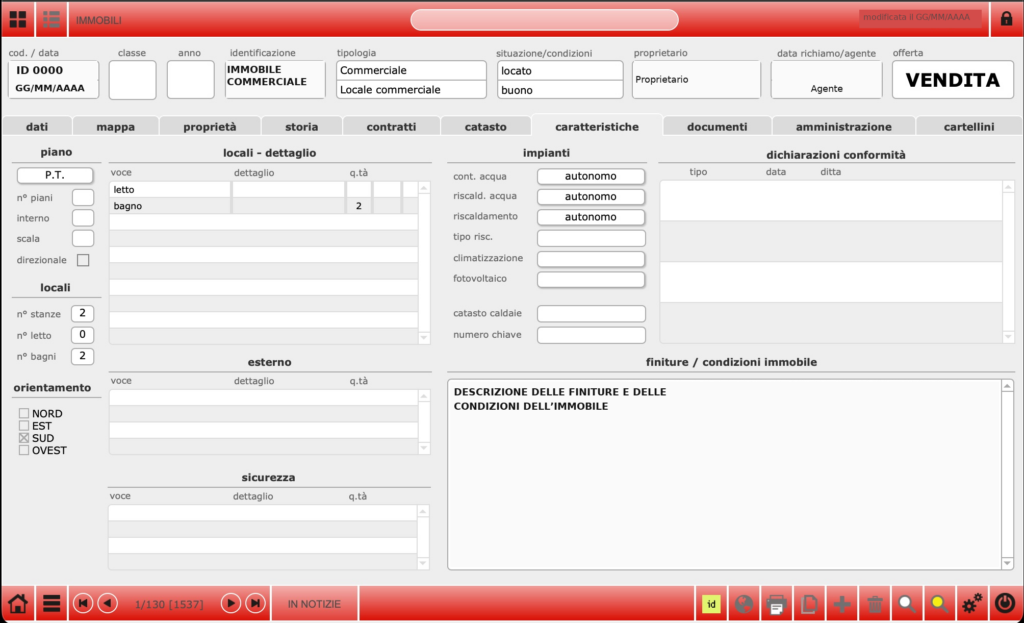
La sezione Caratteristiche descrive la struttura dell’immobile: piano, numero dei piani, interno, scala, orientamento, stanze, posti letto e bagni. Le tabelle consentono di dettagliare locali, spazi esterni e sicurezza. L’area Impianti raccoglie informazioni su acqua, riscaldamento, climatizzazione, fotovoltaico, caldaia e numero di chiavi. Sono presenti anche le dichiarazioni di conformità e un campo per finiture e condizioni dell’immobile.

Scheda caratteristiche dell’immobile, con informazioni dettagliate su ambienti, piano, orientamento, impianti, finiture, condizioni, sicurezza e dichiarazioni di conformità.

Documenti

La sezione Documenti consente di associare all’immobile il materiale amministrativo e operativo. Le righe sono organizzate per tipologia, ad esempio affitto, documenti e fotografie, e riportano note, date di creazione e modifica e dimensioni dei file.

Amministrazione

La sezione Amministrazione è dedicata alle informazioni condominiali e amministrative. Comprende ragione sociale, contatti dell’amministratore e contatti extra, oltre alle aree per bilanci, note, banche e prospetti preventivi o consuntivi.

Cartellini

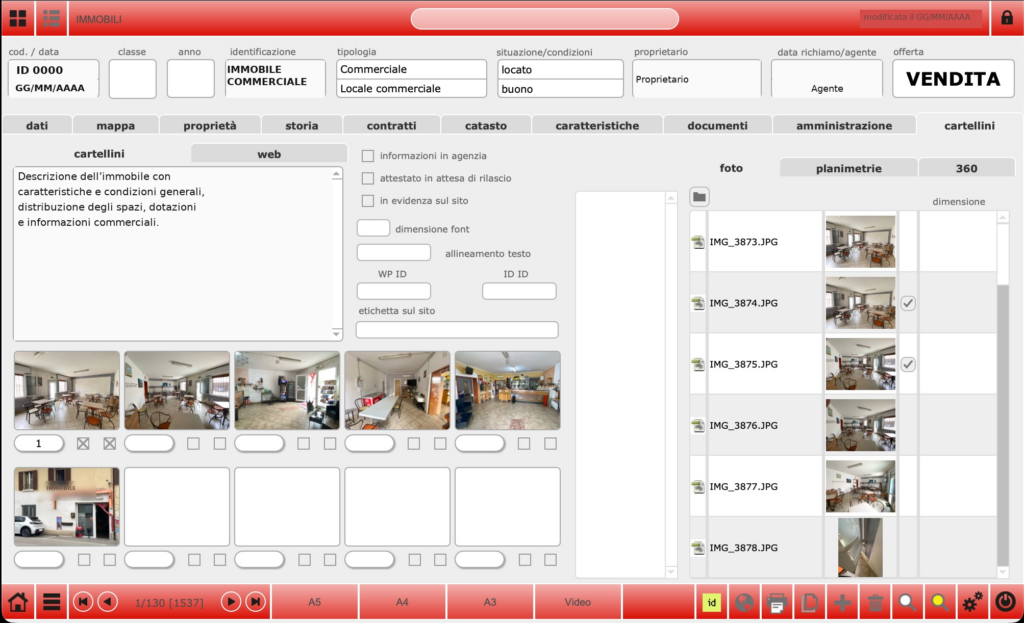
La sezione Cartellini collega la scheda dell’immobile alla sua presentazione commerciale. Qui si può preparare il testo, scegliere quali informazioni rendere visibili in agenzia o sul sito, impostare dimensione e allineamento e gestire l’etichetta web. La stessa area raccoglie fotografie, planimetrie e immagini a 360°.

Tab cartellini, per selezionare e organizzare le immagini dell’immobile, gestire planimetrie e viste a 360° e configurare i contenuti da pubblicare sul web.

Tutto il contesto, in un’unica scheda

La scheda Immobili riunisce dati tecnici, documentazione, immagini e attività commerciali in un’unica struttura. Le sezioni sono collegate tra loro: dall’immobile si può passare alle persone, alle visite, agli appuntamenti, alle proposte e agli altri elementi associati, mantenendo sempre disponibile il contesto completo del lavoro svolto dall’agenzia.

Termini e condizioni

Versione: 1.2 · Ultimo aggiornamento: 17 ottobre 2026

1. Informazioni su PAC Age

Questo sito web, https://www.pacage.it, è gestito da PAC AGE DEVELOPMENT S.A.S. DI PAOLO ALBERTO CASADIO MALAGOLA E C., che opera con il nome commerciale PAC Age development, con sede legale in Viale Francesco Baracca 83, 48121 Ravenna (RA), Italia («PAC Age», «noi», «nostro»).

Iscritta al Registro delle Imprese di Ferrara e Ravenna, numero di iscrizione e codice fiscale 01362080390; partita IVA IT01362080390; numero REA RA - 151293. Per assistenza sui prodotti, richieste e reclami: acasadio@pacage.it. Posta elettronica certificata (PEC): acasadio@pec.pacage.it. Telefono: +39 544 1582550. Le comunicazioni di recesso possono essere inviate anche al nostro indirizzo email per assistenza o inoltro al venditore responsabile, senza pregiudizio per le modalità e i termini indicati nella sezione 11.

2. Ambito e parti contrattuali

Le presenti condizioni disciplinano l’uso del nostro sito web e i nostri obblighi relativi ai prodotti PAC Software, inclusi PAC Order Bridge for WooCommerce, PAC Taxonomy Bridge for WooCommerce, PAC Products Bridge for WooCommerce e gli eventuali bundle o strumenti per sviluppatori espressamente identificati e offerti per l’acquisto. Un prodotto descritto come «coming soon» non è disponibile per l’acquisto, salvo che offriamo espressamente un preordine separato con proprie condizioni di consegna.

Gli acquisti effettuati tramite il checkout di Freemius sono gestiti da Freemius, Inc. in qualità di rivenditore autorizzato e Merchant of Record, come indicato nei documenti del prodotto riportati di seguito. L’indirizzo pubblicato di Freemius è 4023 Kennett Pike, Wilmington, DE 19807, Stati Uniti e l’email di assistenza è support@freemius.com. Le condizioni applicabili alla transazione sono fornite tramite il checkout e i documenti d’ordine. PAC Age sviluppa i prodotti ed è responsabile dei servizi software, delle funzionalità, dell’assistenza e della manutenzione che si impegna a fornire. Freemius gestisce i propri obblighi relativi a pagamenti, fatturazione e ordini. Il riferimento ai nostri prodotti non significa che PAC Age sia il venditore di una transazione per la quale Freemius è indicata come venditore.

I documenti pubblici dei prodotti sono:

PAC Order Bridge for WooCommerce
Condizioni di vendita · EULA

PAC Taxonomy Bridge for WooCommerce
Condizioni di vendita · EULA

PAC Products Bridge for WooCommerce
Condizioni di vendita · EULA

Prima dell’ordine, esamina la descrizione del prodotto, i dettagli del piano, la licenza software e le condizioni per gli acquirenti Freemius collegate nel checkout. Prevalgono sempre le norme imperative. La licenza software disciplina i diritti sul codice; l’ordine accettato identifica le prestazioni acquistate; le condizioni per gli acquirenti Freemius disciplinano la transazione con Freemius; le presenti condizioni disciplinano il nostro sito e gli impegni relativi ai prodotti. Nessuno di questi documenti riduce un diritto inderogabile o una promessa espressa più favorevole fatta prima dell’acquisto. In caso di incoerenza, contattaci prima dell’ordine per chiarire la situazione.

Lo sviluppo personalizzato, l’installazione, la migrazione dei dati, la consulenza e le integrazioni su misura richiedono un accordo separato e non sono inclusi nell’acquisto standard di un plugin, salvo espressa indicazione.

3. Clienti e ordini

Devi avere la capacità giuridica di concludere il contratto pertinente. Se effettui un ordine per un’organizzazione, devi essere autorizzato ad agire per suo conto. Fornisci dati accurati relativi all’account, alla fatturazione, al Paese e, se pertinente, all’identificazione fiscale. Il solo possesso di una partita IVA non esclude le tutele dei consumatori che ti spettano per legge.

Prima di effettuare un ordine puoi verificare il prodotto selezionato, il piano, il numero di siti, il periodo di fatturazione, la valuta, le imposte e l’importo totale, nonché correggere i dati inseriti. La conclusione del contratto e l’accettazione dell’ordine sono disciplinate dalle condizioni per gli acquirenti Freemius presentate prima del pagamento. La conferma di ricezione non costituisce necessariamente accettazione.

La conferma d’ordine identifica il prodotto acquistato e le relative prestazioni. Conservala insieme alle condizioni applicabili. Se il pagamento è stato effettuato ma l’ordine non può essere eseguito, il venditore responsabile deve rimborsare il pagamento secondo la legge applicabile.

4. Informazioni sul prodotto e requisiti tecnici

La pagina del prodotto e la documentazione descrivono le funzioni incluse, le versioni supportate, i requisiti di installazione, la compatibilità e le eventuali limitazioni rilevanti conosciute. Le edizioni a pagamento e gratuite possono offrire funzionalità diverse. Una roadmap non costituisce una promessa relativa a una funzione futura o a una data di consegna, salvo che sia espressamente inclusa nell’ordine.

I nostri bridge WooCommerce richiedono un ambiente WordPress e WooCommerce idoneo e una configurazione Claris FileMaker compatibile, con l’accesso richiesto alla Data API, connettività di rete, autorizzazioni e script necessari. Le licenze software di terzi, l’hosting, le quote API e gli altri costi di terzi non sono inclusi, salvo espressa indicazione.

I bridge supportano gli eventi e i flussi di dati espressamente documentati per il prodotto pertinente. Gli script FileMaker e la logica aziendale determinano l’elaborazione successiva. Verifica i tuoi requisiti prima dell’acquisto e chiedici informazioni su qualsiasi problema di compatibilità rilevante per l’uso previsto. Ciò non trasferisce su di te la nostra responsabilità legale per la conformità del prodotto.

5. Prezzi, imposte e pagamenti

Il checkout mostra il prezzo applicabile e la valuta prima che tu ti impegni al pagamento. Per i consumatori, il totale da pagare comprende le imposte applicabili e gli oneri obbligatori. Quando l’importo definitivo delle imposte dipende dal luogo o dallo status fiscale del cliente, le informazioni pertinenti e il totale finale vengono mostrati prima dell’acquisto.

Freemius gestisce la riscossione dei pagamenti, il calcolo delle imposte sulla transazione, le ricevute o fatture e i rimborsi per le transazioni in cui opera come Merchant of Record. Qualsiasi esenzione fiscale o applicazione del reverse charge è soggetta alle norme applicabili e alle relative verifiche. La conversione valutaria o le commissioni applicate separatamente dalla banca o dal fornitore di pagamento sono disciplinate dal tuo accordo con tale soggetto.

Le promozioni si applicano esclusivamente alle condizioni indicate nell’offerta. Uno sconto sul primo periodo non si applica ai rinnovi successivi, salvo espressa indicazione. Non sostituiremo un prodotto diverso né modificheremo sostanzialmente un ordine accettato senza il tuo accordo o altra base giuridica.

6. Consegna, account e attivazione

I prodotti vengono consegnati in formato elettronico tramite il download, l’account o il processo di attivazione indicato nel checkout e nella conferma d’ordine. Qualsiasi ritardo previsto deve essere comunicato prima dell’acquisto. Contatta l’assistenza se non ricevi l’accesso promesso.

Conserva al sicuro le credenziali dell’account e le chiavi di licenza. Non divulgarle pubblicamente e non utilizzare l’account commerciale di un altro cliente. Segnala tempestivamente qualsiasi accesso non autorizzato sospetto. Prima di modificare un account o una licenza potremmo richiedere una verifica ragionevole.

L’attivazione online, i controlli delle prestazioni acquistate e la distribuzione degli aggiornamenti possono utilizzare Freemius. Qualsiasi requisito rilevante di connettività continuativa o di un servizio esterno deve essere indicato nelle informazioni sul prodotto prima dell’acquisto.

7. Licenze software e prestazioni legate ai siti

La licenza inclusa in ciascun prodotto disciplina l’uso, la copia, la modifica e la ridistribuzione del relativo codice. I componenti open source restano soggetti alle rispettive licenze e agli avvisi applicabili. Nulla nelle presenti condizioni limita i diritti concessi dalla GNU General Public License o da un’altra licenza open source applicabile, inclusi i diritti di eseguire, esaminare, modificare o ridistribuire il codice coperto da tali licenze, nel rispetto delle loro condizioni.

Una chiave di licenza commerciale identifica l’accesso a servizi e prestazioni a pagamento, come aggiornamenti ufficiali, assistenza o funzionalità ospitate. Il numero di siti indicato nell’ordine limita tali prestazioni commerciali nella misura consentita dalla licenza software; non introduce una limitazione ulteriore ai diritti GPL. Il trattamento degli ambienti di staging, delle reti multisito, dei siti dei clienti e dei trasferimenti di sito è specificato nella descrizione del piano prima dell’acquisto.

Non devi utilizzare impropriamente la nostra infrastruttura di attivazione, ottenere fraudolentemente servizi a pagamento o distribuire credenziali private dell’account o chiavi di licenza. Queste limitazioni non vietano la ridistribuzione lecita del codice open source. I marchi di terzi restano di proprietà dei rispettivi titolari; i riferimenti a WordPress, WooCommerce o Claris non implicano approvazione o sponsorizzazione.

8. Abbonamenti, rinnovi e cancellazione

Un abbonamento ricorrente esiste solo quando il checkout identifica espressamente la fatturazione ricorrente. Devono essere indicati l’intervallo di fatturazione, il prezzo iniziale, il prezzo di rinnovo o il relativo calcolo e le condizioni di cancellazione prima dell’acquisto. Un ordine una tantum non crea un addebito ricorrente.

Quando autorizzi il rinnovo automatico, gli addebiti si ripetono agli intervalli indicati fino alla cancellazione. Gestisci il rinnovo tramite l’account cliente Freemius o il link di gestione fornito con l’acquisto. Puoi anche contattare l’assistenza. La cancellazione del rinnovo impedisce i rinnovi futuri e normalmente lascia disponibile la prestazione pagata in corso fino alla scadenza indicata.

La cancellazione del rinnovo e il recesso previsto dalla legge sono diritti diversi. La cancellazione del rinnovo non rimborsa di per sé un periodo già fornito, ma non incide sui rimedi previsti dalla legge o su un’eventuale promessa di rimborso applicabile. Restano applicabili gli avvisi di rinnovo e gli strumenti di cancellazione richiesti dalla legge locale.

Le EULA pubblicate dei prodotti tutelano l’importo del rinnovo finché l’abbonamento rimane attivo e non modifichi il piano o il livello di licenza. Rispetteremo ogni protezione del prezzo inclusa nelle condizioni d’acquisto accettate. Qualsiasi altra modifica proposta al prezzo di rinnovo deve avere una base contrattuale lecita ed essere comunicata con il preavviso e il consenso richiesti dalla legge applicabile. Non modifica il prezzo di un periodo già pagato. Puoi rifiutare una modifica consentita cancellando il rinnovo futuro.

Le condizioni Freemius pubblicate per Order, Taxonomy e Products stabiliscono che le funzionalità a pagamento vengono disabilitate alla scadenza della licenza di abbonamento. Il checkout e le informazioni sul piano devono spiegare questo comportamento, insieme alla scadenza degli aggiornamenti commerciali, dell’assistenza e degli eventuali servizi ospitati. La scadenza non revoca i diritti già concessi da una licenza open source. Non presumere che un piano ricorrente includa l’accesso perpetuo ai servizi ospitati. Un’offerta «lifetime» o perpetua, se disponibile, deve definire espressamente la durata di ciascuna prestazione inclusa prima dell’acquisto.

9. Aggiornamenti, sicurezza e assistenza

Gli aggiornamenti ufficiali delle funzionalità e l’assistenza tecnica ordinaria vengono forniti per il periodo incluso nel piano. Il loro ambito, il canale di contatto e gli eventuali tempi di risposta promessi sono specificati prima dell’acquisto. Salvo espressa inclusione, l’assistenza ordinaria non comprende la realizzazione di soluzioni FileMaker personalizzate, lo sviluppo di codice di terzi, l’amministrazione dei tuoi server o la realizzazione di un’integrazione su misura.

Questi periodi di assistenza commerciale non limitano alcun rimedio di conformità previsto dalla legge né l’obbligo di fornire gli aggiornamenti necessari, inclusi quelli di sicurezza. Installa gli aggiornamenti pertinenti entro un termine ragionevole dopo aver ricevuto istruzioni chiare. La mancata installazione di un aggiornamento non elimina i diritti relativi a difetti diversi.

Possiamo apportare modifiche lecite al prodotto per mantenere sicurezza, compatibilità o funzionalità. Le modifiche che riguardano un prodotto digitale fornito continuativamente devono rispettare gli obblighi applicabili di informazione, contratto e recesso. Quando richiesto, forniremo un preavviso su un supporto durevole e spiegheremo ogni diritto di recedere senza costi. Non faremo affidamento su una clausola generale di modifica per rimuovere illecitamente funzioni essenziali già pagate.

10. Il tuo ambiente di integrazione

Mantieni backup adeguati, prova le modifiche sostanziali in un ambiente idoneo, proteggi le credenziali di accesso e concedi alle integrazioni solo le autorizzazioni ragionevolmente necessarie. Sei responsabile dei tuoi dati, delle istruzioni lecite sul loro trattamento, degli account di terzi e della logica aziendale personalizzata.

Guasti di rete, indisponibilità di servizi di terzi ed errori di configurazione possono influire sulla consegna o sulla sincronizzazione. Monitora i flussi aziendali importanti e verifica i risultati successivi. Queste responsabilità pratiche non giustificano un difetto del nostro prodotto né escludono la responsabilità imposta dalla legge. Quando richiedi assistenza, evita di inviare password attive o dati personali non necessari; quando serve l’accesso, utilizza un metodo sicuro concordato.

11. Recesso legale dei consumatori

Quando si applicano le norme UE o SEE sui contratti a distanza, i consumatori dispongono generalmente di 14 giorni dalla conclusione del contratto per recedere, fatte salve le eccezioni previste dalla legge e qualsiasi tutela più lunga prevista dalla legge nazionale applicabile. Per gli acquisti effettuati tramite Freemius, puoi esercitare un diritto disponibile inviando una dichiarazione esplicita a Freemius, Inc., 4023 Kennett Pike, Wilmington, DE 19807, Stati Uniti, support@freemius.com. Puoi anche contattarci all’indirizzo acasadio@pacage.it per assistenza e inoltro. Puoi utilizzare il modulo tipo riportato di seguito, ma non è obbligatorio. È sufficiente inviare la dichiarazione al venditore entro il termine; per esercitare un diritto di recesso disponibile non sono necessarie autorizzazioni o motivazioni preventive.

Per i contenuti digitali a pagamento forniti senza supporto materiale, il diritto si perde solo quando l’esecuzione inizia dopo che hai acconsentito espressamente e preventivamente alla fornitura durante il periodo di recesso, riconosciuto che ciò comporterà la perdita del diritto e ricevuto la conferma richiesta dalla legge. La semplice accettazione delle condizioni generali, l’apertura del sito o l’acquisto di un prodotto digitale non soddisfano di per sé tali requisiti.

Per i servizi, la richiesta di iniziare anticipatamente non elimina automaticamente il diritto di recesso: qualsiasi pagamento proporzionale o perdita del diritto in caso di esecuzione completa richiede il rispetto delle condizioni specifiche previste dalla legge. L’eccezione relativa ai contenuti digitali non deve essere applicata indiscriminatamente all’assistenza, ai servizi ospitati o ai contratti misti.

Quando la legge richiede una funzione online di recesso per il contratto pertinente, il venditore deve renderla chiaramente visibile e facilmente accessibile nell’interfaccia online per tutto il periodo in cui il diritto legale di recesso può essere esercitato. La funzione deve consentire di inviare e confermare il recesso e di ricevere una conferma su un supporto durevole. I metodi email e postali indicati sopra restano disponibili e non sostituiscono una funzione online richiesta dalla legge. La cancellazione del rinnovo automatico dall’account cliente non costituisce, di per sé, esercizio del recesso legale.

A seguito di un recesso valido, il venditore responsabile rimborsa gli importi dovuti senza indebito ritardo ed entro il termine previsto dalla legge, generalmente 14 giorni dalla comunicazione, utilizzando il metodo di pagamento originale salvo diverso accordo espresso, senza costi di rimborso. Un eventuale addebito proporzionale legittimo per servizi già forniti viene valutato solo quando ricorrono le condizioni previste dalla legge.

12. Richieste di rimborso e conformità del prodotto

Per Order, Taxonomy e Products, i documenti Freemius pubblicati prevedono un rimedio commerciale condizionato per un difetto riscontrato nei primi 14 giorni dall’acquisto che renda inutilizzabili funzioni software rilevanti e non possa essere risolto con la ragionevole collaborazione dell’assistenza. La policy applicabile prevede un rimborso completo o la sostituzione con software privo di difetti. Essa esclude le funzionalità mancanti e i conflitti o le incompatibilità con terzi da questa policy commerciale aggiuntiva e non prevede un nuovo diritto commerciale al rimborso per gli upgrade, le licenze aggiuntive o i rinnovi elencati. Le disposizioni su bundle e periodi di prova devono essere lette nei documenti del prodotto applicabili collegati sopra. Il riepilogo introduttivo della EULA non sostituisce il testo contrattuale operativo.

Questa policy commerciale si aggiunge ai diritti di recesso previsti dalla legge, ai rimedi per la non conformità e agli altri diritti inderogabili. Le sue esclusioni e il suo termine non limitano i rimedi imposti dalla legge, inclusi quelli relativi a un’incompatibilità che costituisca una mancanza di conformità giuridicamente rilevante. Qualsiasi promessa espressa più favorevole fatta prima dell’acquisto resta applicabile. La versione pertinente è quella accettata con l’ordine; una modifica successiva del sito non la riduce retroattivamente.

Contatta acasadio@pacage.it indicando il riferimento dell’ordine, il prodotto e una descrizione del problema. I rimborsi relativi alla fatturazione delle transazioni Freemius vengono elaborati tramite Freemius. Potremmo richiedere una ragionevole attività di diagnosi, ma l’assistenza o il rimborso non possono essere subordinati a requisiti vietati dalla legge.

I consumatori conservano i diritti previsti dalla legge per i contenuti e i servizi digitali, inclusi i rimedi per la mancata fornitura e la non conformità. Questi possono comprendere il ripristino della conformità del prodotto, un’adeguata riduzione del prezzo, la risoluzione e il rimborso e altri rimedi previsti dalla legge applicabile. Quando pertinente, il ripristino della conformità viene effettuato senza costi, entro un termine ragionevole e senza notevoli inconvenienti. La scadenza dell’assistenza commerciale non estingue tali diritti.

Per i consumatori UE, la durata della responsabilità del venditore e la ripartizione dell’onere della prova dipendono dal fatto che la fornitura sia una tantum o continuativa e dalla legge nazionale applicabile. Le presenti condizioni non impongono un termine più breve. Non sei tenuto ad accettare un credito nel negozio al posto di un rimborso in denaro previsto dalla legge.

13. Sospensione e cessazione dei nostri servizi

Possiamo limitare i nostri servizi commerciali quando ciò sia ragionevolmente necessario per affrontare una frode, un grave rischio per la sicurezza, un uso illecito o una violazione sostanziale che incida su tali servizi. Le misure devono essere proporzionate. Salvo che sia giustificata un’azione urgente, spiegheremo il problema e concederemo una ragionevole possibilità di porre rimedio a una violazione sanabile.

La sospensione non estingue automaticamente i tuoi diritti al rimborso, il diritto di contestare un pagamento o i diritti derivanti da una licenza open source. Se interrompiamo un servizio a pagamento prima della fine del periodo promesso, forniremo il rimedio previsto dalla legge, incluso il rimborso del periodo non fornito quando dovuto. Ove applicabile, verrà affrontato anche l’accesso necessario per recuperare i tuoi dati.

14. Responsabilità

Restiamo responsabili dei nostri obblighi ai sensi della legge applicabile. Nulla esclude o limita la responsabilità per frode, dolo, colpa grave, morte o lesioni personali quando protette dalla legge, responsabilità obbligatoria per danno da prodotto o qualsiasi altra responsabilità che non possa essere legalmente esclusa o limitata. Le garanzie dei consumatori e i rimedi previsti dalla legge restano impregiudicati.

Per i soli clienti professionali e solo nella misura consentita dalla legge applicabile, la nostra responsabilità per colpa ordinaria relativa al servizio del prodotto PAC Age interessato è limitata al danno diretto e ragionevolmente prevedibile e ai corrispettivi pagati per quel prodotto nei 12 mesi precedenti l’evento che ha dato origine alla richiesta. Questa limitazione non si applica alle responsabilità salvaguardate nel paragrafo precedente né quando la legge imperativa dispone diversamente. Perché la limitazione sia applicabile, qualsiasi approvazione specifica richiesta deve essere validamente ottenuta.

Non garantiamo uno specifico risultato commerciale né la compatibilità con ogni configurazione di terzi. Ciò non prevale sulle funzionalità, sulla compatibilità o sulle altre qualità espressamente promesse per il prodotto acquistato o richieste dalla legge. Freemius è separatamente responsabile dei propri obblighi contrattuali e legali; questa clausola non intende definirli né escluderli.

15. Privacy e cookie

La nostra Privacy Policy spiega come trattiamo i dati personali. La nostra Cookie Policy spiega i cookie e le tecnologie simili. Freemius fornisce una propria informativa privacy per il checkout e i servizi ai clienti.

L’accettazione delle presenti condizioni non costituisce consenso al marketing, alle analisi o ai cookie facoltativi. Quando i dati personali sono trattati per conto di un cliente, ove richiesto tale trattamento deve essere disciplinato da un adeguato accordo sul trattamento dei dati. Un normale acquisto di un plugin non ci autorizza di per sé ad accedere al tuo database di produzione.

16. Disponibilità internazionale

I prodotti sono disponibili solo nei territori supportati dal checkout e nei quali la transazione e la fornitura siano lecite. Restrizioni commerciali e sanzioni applicabili possono impedire alcuni ordini. Non ti chiederemo di eludere tali restrizioni o di fornire informazioni false sulla località.

Nel tuo Paese possono applicarsi tutele inderogabili, incluse quelle del Regno Unito, dell’Australia, della Nuova Zelanda, del Canada e dei singoli Stati degli USA. Le presenti condizioni non rinunciano a tali tutele. In particolare, le garanzie previste dall’Australian Consumer Law non possono essere escluse quando applicabili; i rimedi disponibili dipendono dalla natura e dalla gravità dell’inadempimento. Le presenti condizioni PAC Age non impongono arbitrato obbligatorio né rinuncia ad azioni collettive.

17. Reclami, legge applicabile e foro competente

Invia i reclami relativi ai nostri prodotti o servizi a acasadio@pacage.it, indicando il riferimento dell’ordine e il rimedio richiesto. Per le questioni di fatturazione può essere contattato anche il venditore Freemius indicato nei documenti d’ordine. Prenderemo in carico e gestiremo i reclami entro il termine previsto dalla legge applicabile.

Le presenti condizioni PAC Age sono disciplinate dalla legge italiana. Per i consumatori, tale scelta non priva delle tutele inderogabili garantite dalla legge che sarebbe altrimenti applicabile, inclusa, ove pertinente, la legge del Paese di residenza abituale. Restano disponibili i tribunali e i meccanismi di risoluzione delle controversie previsti dalla legge inderogabile.

Per i clienti professionali, le controversie relative alle presenti condizioni PAC Age sono soggette alla giurisdizione dei tribunali competenti secondo le norme procedurali applicabili, salvo che si applichi un separato accordo valido sulla giurisdizione. Le presenti condizioni non individuano il foro per il contratto separato con Freemius.

Quando siamo tenuti per legge o ci siamo impegnati a utilizzare uno specifico organismo di risoluzione alternativa delle controversie (ADR) per una controversia con un consumatore, ne forniremo l’identità, il sito web e le informazioni di accesso applicabili secondo quanto richiesto dalla legge. Se un reclamo di un consumatore presentato direttamente a noi non può essere risolto, forniremo le informazioni sull’organismo o sugli organismi ADR pertinenti e dichiareremo se intendiamo partecipare, su carta o altro supporto durevole, come richiesto dall’articolo 141-sexies del Codice del consumo italiano. Questa clausola non costituisce un impegno preventivo a partecipare a ogni procedura ADR e non limita l’accesso ai tribunali competenti. Le controversie relative agli obblighi propri di Freemius sono disciplinate dalle sue condizioni applicabili, fatte salve le tutele inderogabili dei consumatori.

18. Modifiche e disposizioni generali

Le condizioni accettate per un ordine restano applicabili a quell’ordine. La pubblicazione di una nuova versione non modifica retroattivamente un acquisto esistente. Le modifiche a un rapporto continuativo richiedono una base giuridica lecita e gli obblighi di comunicazione, accettazione e cancellazione previsti dal contratto pertinente e dalla legge applicabile.

Se una disposizione è inapplicabile, le restanti disposizioni continuano ad applicarsi nella misura consentita dalla legge. Nessuna disposizione invalida verrà automaticamente riscritta in modo da ridurre i diritti dei consumatori. Il mancato esercizio immediato di un diritto non costituisce rinuncia permanente.

La lingua del contratto è quella indicata prima dell’acquisto. Quando vengono fornite traduzioni, nessuna clausola di prevalenza linguistica elimina le tutele inderogabili locali o i diritti derivanti dalla versione presentata al cliente.

Modulo tipo per il recesso

Compila e invia questo modulo solo se desideri recedere da un contratto e se è disponibile un diritto di recesso applicabile.

A: Freemius, Inc., 4023 Kennett Pike, Wilmington, DE 19807, Stati Uniti. Email: support@freemius.com.

Per assistenza o inoltro: PAC AGE DEVELOPMENT S.A.S. DI PAOLO ALBERTO CASADIO MALAGOLA E C., Viale Francesco Baracca 83, 48121 Ravenna (RA), Italia. Email: acasadio@pacage.it. Posta elettronica certificata (PEC): acasadio@pec.pacage.it. Telefono: +39 544 1582550.

Con la presente comunico/comunichiamo il recesso dal mio/nostro contratto per la fornitura dei seguenti contenuti o servizi digitali:

Prodotto/servizio: ____________________
Riferimento ordine: ____________________
Ordinato il: ____________________
Nome/i del/dei consumatore/i: ____________________
Indirizzo del consumatore: ____________________
Data: ____________________
Firma/e, solo se inviato su carta: ____________________

Terms & Conditions

Version: 1.2 · Last updated: 17 October 2026

1. About PAC Age

This website, https://www.pacage.it, is operated by PAC AGE DEVELOPMENT S.A.S. DI PAOLO ALBERTO CASADIO MALAGOLA E C., trading as PAC Age development, with registered office at Viale Francesco Baracca 83, 48121 Ravenna (RA), Italy (“PAC Age”, “we”, “us”).

Registered in the Registro delle Imprese di Ferrara e Ravenna, registration and Italian tax identification number 01362080390; VAT number IT01362080390; REA number RA - 151293. Product support, enquiries and complaints: acasadio@pacage.it. Certified email (PEC): acasadio@pec.pacage.it. Telephone: +39 544 1582550. Withdrawal notices may also be sent to our email address for assistance or forwarding to the responsible seller, without prejudice to the methods and deadlines set out in section 11.

2. Scope and contractual parties

These terms govern use of our website and our obligations concerning PAC Software products, including PAC Order Bridge for WooCommerce, PAC Taxonomy Bridge for WooCommerce, PAC Products Bridge for WooCommerce and any expressly identified bundles or developer tools offered for purchase. A product described as “coming soon” is not available for purchase unless we expressly offer a separate preorder with its own delivery terms.

Purchases made through the Freemius checkout are handled by Freemius, Inc. as authorised reseller and Merchant of Record, as identified in the product documents below. Freemius' published address is 4023 Kennett Pike, Wilmington, DE 19807, United States, and its support email is support@freemius.com. Its applicable transaction terms are supplied through the checkout and order documents. PAC Age develops the products and is responsible for the software services, features, support and maintenance that it undertakes to supply. Freemius handles its payment, billing and order obligations. References to our products do not mean that PAC Age is the seller of a transaction for which Freemius is identified as the seller.

The public product documents are:

PAC Order Bridge for WooCommerce
Terms of sale · EULA

PAC Taxonomy Bridge for WooCommerce
Terms of sale · EULA

PAC Products Bridge for WooCommerce
Terms of sale · EULA

Before ordering, review the product description, plan details, software licence and Freemius buyer terms linked in the checkout. Mandatory law always prevails. The software licence governs rights in the code; the accepted order identifies the purchased entitlements; Freemius buyer terms govern the transaction with Freemius; these terms govern our website and product commitments. None of these documents reduces a mandatory right or a more favourable express promise made to you before purchase. If there is an inconsistency, contact us before ordering so that it can be clarified.

Custom development, installation, data migration, consulting and bespoke integrations require a separate agreement and are not included in a standard plugin purchase unless expressly stated.

3. Customers and ordering

You must have the legal capacity to enter the relevant contract. When ordering for an organisation, you must be authorised to act on its behalf. Supply accurate account, billing, country and, where relevant, tax identification details. A VAT number does not by itself remove any consumer protection that legally applies to you.

Before placing an order you can review the selected product, plan, number of sites, billing period, currency, tax and total charge, and correct the information entered. Contract formation and acceptance of the order are governed by the Freemius buyer terms presented before payment. An acknowledgement of receipt is not necessarily acceptance.

Your order confirmation identifies the purchased product and entitlements. Keep it together with the applicable terms. If payment is taken but the order cannot be fulfilled, the payment must be refunded by the responsible seller in accordance with applicable law.

4. Product information and technical requirements

The product page and documentation describe the included functions, supported versions, installation requirements, compatibility and any known material limitations. Paid and free editions may provide different features. A roadmap is not a promise of a future feature or delivery date unless expressly included in your order.

Our WooCommerce bridges require a suitable WordPress and WooCommerce environment and a compatible Claris FileMaker setup with the required Data API access, network connectivity, permissions and scripts. Third-party software licences, hosting, API allowances and other third-party charges are not included unless expressly stated.

The bridges support the events and data flows expressly documented for the relevant product. Your FileMaker scripts and business logic determine downstream processing. Review your requirements before purchase and ask us about any compatibility issue that is material to your intended use. This does not transfer our legal responsibility for product conformity to you.

5. Prices, taxes and payments

The checkout displays the applicable charge and currency before you commit to payment. For consumers, the payable total includes applicable taxes and mandatory charges. Where a final tax amount depends on customer location or tax status, the relevant information and final total are displayed before purchase.

Freemius handles payment collection, transaction tax calculations, receipts or invoices, and payment refunds for transactions for which it acts as Merchant of Record. Any entitlement to tax exemption or reverse charge is subject to applicable rules and verification. Currency conversion or fees imposed separately by your bank or payment provider are governed by your agreement with that provider.

Promotions apply only on the terms shown with the offer. A first-period discount does not apply to later renewals unless explicitly stated. We will not substitute a different product or materially change an accepted order without your agreement or another lawful basis.

6. Delivery, accounts and activation

Products are delivered electronically through the download, account or activation process identified in the checkout and order confirmation. Any expected delay must be disclosed before purchase. Contact support if you do not receive the promised access.

Keep account credentials and licence keys secure. Do not disclose them publicly or use another customer's commercial account. Report suspected unauthorised access promptly. Reasonable verification may be required before account or licence changes.

Online activation, entitlement checks and update delivery may use Freemius. Any material requirement for ongoing connectivity or an external service must be disclosed in the product information before purchase.

7. Software licences and site entitlements

The licence included with each product governs use, copying, modification and redistribution of its code. Open-source components retain their respective licences and notices. Nothing in these terms restricts rights granted by the GNU General Public License or another applicable open-source licence, including rights to run, inspect, modify or redistribute covered code subject to that licence.

A commercial licence key identifies access to paid services and entitlements, such as official updates, support or hosted features. The number of sites stated in your order limits those commercial entitlements to the extent permitted by the software licence; it does not impose an additional restriction on GPL rights. Treatment of staging environments, multisite networks, client sites and site transfers is specified in the plan description before purchase.

You must not misuse our activation infrastructure, fraudulently obtain paid services, or distribute our private account credentials or licence keys. These restrictions do not prohibit lawful redistribution of open-source code. Third-party trademarks remain the property of their owners; references to WordPress, WooCommerce or Claris do not imply endorsement.

8. Subscriptions, renewals and cancellation

A recurring subscription exists only where the checkout expressly identifies recurring billing. It must show the billing interval, initial price, renewal price or applicable calculation, and cancellation terms before purchase. A one-time order does not create a recurring charge.

Where you authorise automatic renewal, charges recur at the disclosed intervals until cancellation. Manage renewal through the Freemius customer account or the management link supplied with the purchase. You may also contact support for assistance. Cancelling renewal prevents future renewals and normally leaves the current paid entitlement available until its disclosed expiry.

Cancellation of renewal and statutory withdrawal are different rights. Cancelling renewal does not by itself refund an already supplied period, but it does not affect statutory remedies or an applicable refund promise. Renewal notices and cancellation facilities required by local law remain applicable.

The published product EULAs protect the renewal amount while the subscription remains active and you do not change the plan or licence level. We will respect any such price protection included in your accepted purchase terms. Any other proposed renewal price change must have a lawful contractual basis and be communicated with the notice and consent required by applicable law. It does not alter the price of a period already paid for. You may decline a permitted change by cancelling future renewal.

The published Freemius terms for Order, Taxonomy and Products state that paid features are disabled when the subscription licence expires. Your checkout and plan information must explain this behaviour, together with the expiry of commercial updates, support and any hosted services. Expiry does not revoke rights already granted under an open-source licence. Do not assume that a recurring plan includes perpetual access to hosted services. A “lifetime” or perpetual offer, if available, must expressly define the duration of each included entitlement before purchase.

9. Updates, security and support

Official feature updates and ordinary technical support are supplied for the period included in your plan. Their scope, contact channel and any promised response times are specified before purchase. Unless expressly included, ordinary support does not cover building custom FileMaker solutions, developing third-party code, administering your servers or carrying out a bespoke integration.

These commercial support periods do not limit any legally required conformity remedy or obligation to provide necessary updates, including security updates. Install relevant updates within a reasonable time after receiving clear instructions. Failure to install an update does not remove rights concerning unrelated defects.

We may make lawful product changes to maintain security, compatibility or functionality. Changes affecting a continuously supplied digital product must satisfy applicable information, contractual and termination requirements. Where required, we will provide advance notice on a durable medium and explain any right to terminate without charge. We will not rely on a general change clause to remove paid-for essential functions unlawfully.

10. Your integration environment

Maintain appropriate backups, test substantial changes in a suitable environment, protect access credentials, and grant integrations only the permissions reasonably needed. You are responsible for your own data, lawful processing instructions, third-party accounts and custom business logic.

Network failures, third-party outages and configuration errors may affect delivery or synchronisation. Monitor important business workflows and validate downstream results. These practical responsibilities do not excuse a defect in our product or exclude liability imposed by law. When requesting support, avoid sending live passwords or unnecessary personal data; use an agreed secure access method where access is needed.

11. Statutory withdrawal for consumers

Where EU or EEA distance-contract rules apply, consumers generally have 14 days from conclusion of the contract to withdraw, subject to the legal exceptions and any longer protection under applicable national law. For purchases through Freemius, you may exercise an available right by sending a clear statement to Freemius, Inc., 4023 Kennett Pike, Wilmington, DE 19807, United States, support@freemius.com. You may also contact us at acasadio@pacage.it for assistance and forwarding. You may use the model form below, but it is not compulsory. Sending the statement to the seller before the deadline is sufficient; no prior approval or explanation is required to exercise an available statutory right.

For paid digital content supplied without a physical medium, the right is lost only when performance begins after you have expressly consented in advance to delivery during the withdrawal period, acknowledged that this will result in loss of the right, and received the confirmation required by law. Merely accepting general terms, opening the website, or buying a digital product does not by itself satisfy these conditions.

For services, requesting an early start does not automatically remove the withdrawal right: any proportionate payment or loss of the right on full performance requires the separate conditions imposed by law. The digital-content exception must not be used indiscriminately for support, hosted services or mixed contracts.

Where the law requires an online withdrawal function for the relevant contract, the seller must also make that function clearly visible and easily accessible on the online interface throughout the period in which the statutory withdrawal right remains exercisable. The function must allow you to submit and confirm withdrawal and receive an acknowledgement on a durable medium. The email and postal methods above remain available and do not replace a legally required online function. Cancellation of automatic renewal in a customer account is not, by itself, the exercise of statutory withdrawal.

Following a valid withdrawal, the responsible seller refunds amounts due without undue delay and within the statutory deadline, generally 14 days after notification, using the original payment method unless otherwise expressly agreed, without a refund fee. Any lawful proportionate charge for services already supplied is assessed only where the statutory conditions are met.

12. Refund requests and product conformity

For Order, Taxonomy and Products, the published Freemius product documents provide a conditional commercial remedy for a defect experienced during the first 14 days after purchase that makes material software functions unusable and cannot be resolved following reasonable cooperation with support. The operative policy provides for a full refund or replacement with non-defective software. It excludes missing features and third-party conflicts or incompatibilities from this additional commercial policy, and does not provide a new commercial refund entitlement for the listed upgrades, additional licences or renewals. Bundle and trial provisions must be read in the applicable product documents linked above. The EULA's introductory summary does not replace its operative contractual text.

This commercial policy is additional to statutory withdrawal rights, conformity remedies and other mandatory rights. Its exclusions and deadline do not limit remedies imposed by law, including remedies for an incompatibility that constitutes a legal lack of conformity. Any more favourable express promise made to you before purchase remains applicable. The policy accepted with your order is the relevant version; a later website change does not retrospectively reduce it.

Contact acasadio@pacage.it with your order reference, product and a description of the issue. Billing refunds for Freemius transactions are processed through Freemius. Reasonable troubleshooting may be requested, but assistance or a refund cannot be made conditional on requirements prohibited by law.

Consumers retain the legal rights applicable to digital content and digital services, including remedies for failure to supply and lack of conformity. These may include bringing the product into conformity, an appropriate price reduction, termination and reimbursement, and other remedies under applicable law. Where applicable, restoration of conformity is provided without charge, within a reasonable time and without significant inconvenience. Commercial support expiry does not end these rights.

For EU consumers, the duration of the seller's responsibility and the allocation of the burden of proof depend on whether supply is one-off or continuous and on applicable national law. No shorter period is imposed by these terms. You need not accept a store credit instead of a legally required money refund.

13. Suspension and termination of our services

We may restrict our commercial services where reasonably necessary to address fraud, a serious security risk, unlawful use or a material breach affecting those services. Measures must be proportionate. Unless urgent action is justified, we will explain the issue and give a reasonable opportunity to remedy a remediable breach.

Suspension does not automatically extinguish your refund rights, your right to dispute a payment or your open-source licence rights. Where we discontinue a paid service before the end of the period promised, we will provide the remedy required by law, including reimbursement for an unprovided period where due. Necessary access to retrieve your data will be addressed where applicable.

14. Liability

We remain responsible for our obligations under applicable law. Nothing excludes or limits liability for fraud, wilful misconduct, gross negligence, death or personal injury where legally protected, mandatory product liability, or any other liability that cannot lawfully be excluded or limited. Consumer guarantees and statutory remedies remain unaffected.

For business customers only, and only to the extent permitted by applicable law, our liability for ordinary negligence concerning the affected PAC Age product service is limited to direct, reasonably foreseeable loss and to the fees paid for that affected product during the 12 months preceding the event giving rise to the claim. This limitation does not apply to the liabilities preserved in the preceding paragraph or where mandatory law requires otherwise. Any separately required specific approval must be validly obtained for this limitation to apply.

We do not guarantee a particular commercial outcome or compatibility with every third-party configuration. This does not override the functionality, compatibility or other qualities expressly promised for the purchased product or required by law. Freemius is separately responsible for its own contractual and legal obligations; this clause does not purport to define or exclude those obligations.

15. Privacy and cookies

Our Privacy Policy explains our processing of personal data. Our Cookie Policy explains cookies and similar technologies. Freemius provides its own privacy information for its checkout and customer services.

Accepting these terms is not consent to optional marketing, analytics or cookies. Where personal data is processed on a customer's behalf, an appropriate data processing agreement must govern that processing where required. An ordinary plugin purchase does not itself authorise us to access your production database.

16. International availability

Products are available only in territories supported by the checkout and where the transaction and supply are lawful. Applicable trade restrictions and sanctions may prevent some orders. We will not ask you to evade such restrictions or provide false location information.

Mandatory protections in your country may apply, including in the United Kingdom, Australia, New Zealand, Canada and individual US states. These terms do not waive those protections. In particular, Australian Consumer Law guarantees cannot be excluded where they apply; available remedies depend on the nature and seriousness of the failure. No mandatory arbitration or class-action waiver is imposed by these PAC Age terms.

17. Complaints, applicable law and courts

Send complaints about our products or services to acasadio@pacage.it, including your order reference and the remedy requested. For billing matters, the Freemius seller identified in your order documents may also be contacted. We will acknowledge and handle complaints within the timeframe required by applicable law.

These PAC Age terms are governed by Italian law. For consumers, that choice does not deprive you of mandatory protection afforded by the law that would otherwise apply, including the law of your habitual residence where applicable. You retain access to the courts and dispute resolution mechanisms available under mandatory law.

For business customers, disputes concerning these PAC Age terms are subject to the jurisdiction of the competent courts under applicable procedural law, unless a separate valid jurisdiction agreement applies. These terms do not select a court for the separate contract with Freemius.

Where we are legally required or have committed to use a particular alternative dispute resolution (ADR) body for a consumer dispute, we will provide its identity, website and the applicable access information as required by law. If a consumer complaint submitted directly to us cannot be resolved, we will provide the information about the relevant ADR body or bodies and state whether we intend to participate, on paper or another durable medium, as required by Article 141-sexies of the Italian Consumer Code. This clause does not create an advance commitment to participate in every ADR procedure and does not limit access to the competent courts. Disputes concerning Freemius' own obligations are addressed under its applicable terms, subject to mandatory consumer protection.

18. Changes and general provisions

The terms accepted for an order remain applicable to that order. Publishing a new version does not retroactively alter an existing purchase. Changes to an ongoing relationship require a lawful basis and the notice, acceptance and cancellation rights required by the relevant contract and applicable law.

If a provision is unenforceable, the remaining provisions continue only to the extent permitted by law. No invalid provision will be automatically rewritten so as to reduce consumer rights. Failure to enforce a right immediately is not a permanent waiver.

The contract language is the language identified before purchase. Where translations are supplied, no language-priority provision removes mandatory local language protections or rights arising from the version presented to you.

Model withdrawal form

Complete and send this form only if you wish to withdraw from a contract and an applicable withdrawal right is available.

To: Freemius, Inc., 4023 Kennett Pike, Wilmington, DE 19807, United States. Email: support@freemius.com.

For assistance or forwarding: PAC AGE DEVELOPMENT S.A.S. DI PAOLO ALBERTO CASADIO MALAGOLA E C., Viale Francesco Baracca 83, 48121 Ravenna (RA), Italy. Email: acasadio@pacage.it. Certified email (PEC): acasadio@pec.pacage.it. Telephone: +39 544 1582550.

I/We hereby give notice that I/we withdraw from my/our contract for the supply of the following digital content or services:

Product/service: ____________________
Order reference: ____________________
Ordered on: ____________________
Consumer name(s): ____________________
Consumer address: ____________________
Date: ____________________
Signature(s), only if submitted on paper: ____________________