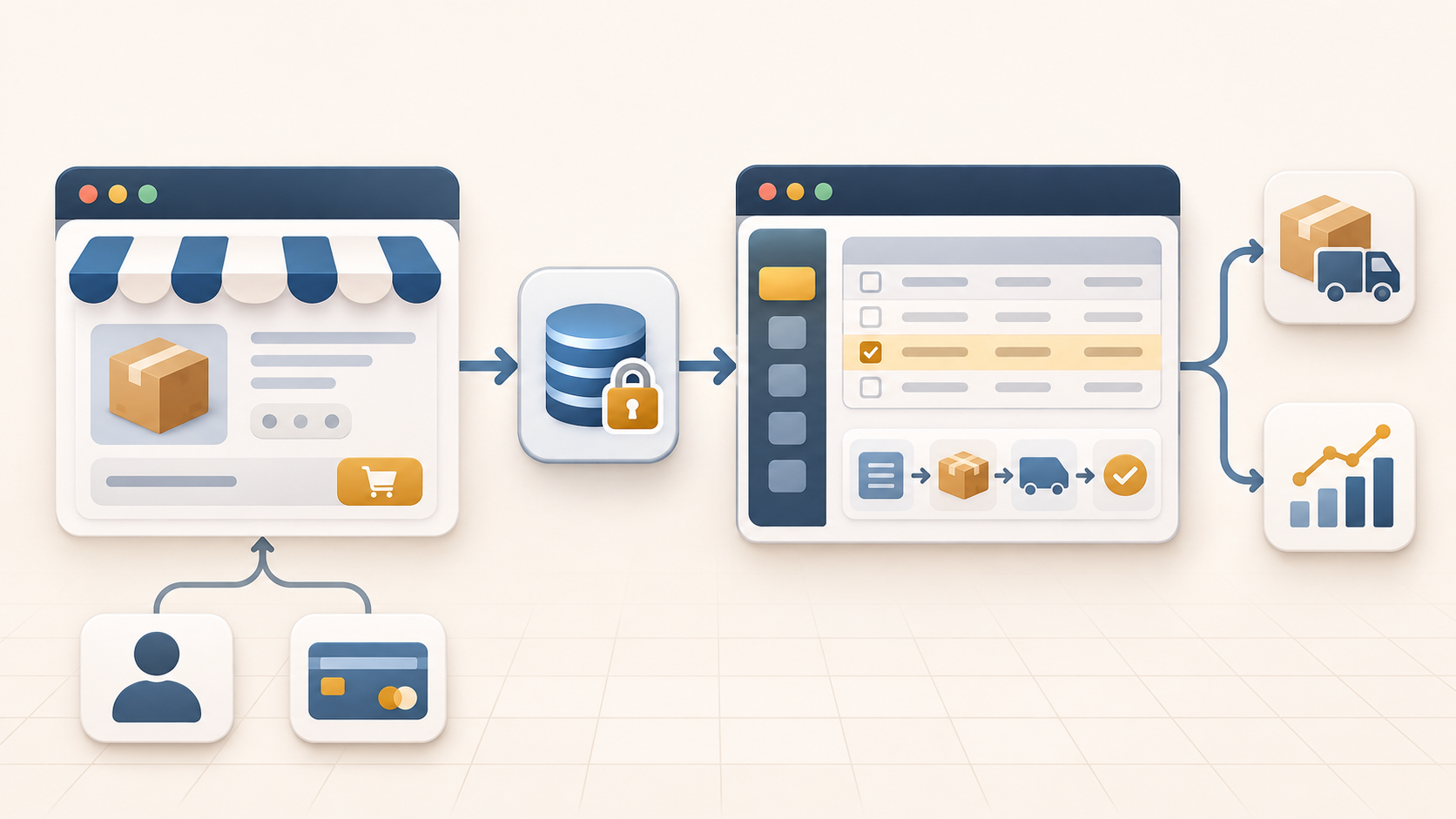
An online store is one part of a business operation, not the whole operation. WooCommerce manages the customer-facing transaction: products are presented, an order is placed and its status changes as payment and fulfilment progress. Behind that storefront, a company may rely on a business system for customers, stock, purchasing, delivery, administration and internal follow-up. The web shop is where the transaction begins, but it is rarely where the entire business process ends.
This distinction becomes important as soon as an order has consequences beyond the checkout page. A paid order may need to be checked against internal rules, assigned to a department, prepared for fulfilment, included in a report or connected with an existing customer record. If the online store and the operational system remain separate, every one of those steps depends on a person or on a second, custom mechanism. If they communicate through a controlled integration, WooCommerce can become a reliable source of operational events rather than an isolated sales channel.

Why WooCommerce and the business system should communicate
WooCommerce and a business management system have different responsibilities. WooCommerce is designed for the online buying experience and for the transactions generated by that experience. It knows about the catalogue presented to visitors, the cart, checkout, payment methods and the order lifecycle. A system such as Claris FileMaker can be shaped around the wider processes of a specific company: its records, approvals, internal calculations, documents, service procedures and operational rules.
The two systems are therefore complementary rather than interchangeable. An order accepted by the store may need to create or update a record in FileMaker. This is particularly useful when the customer is buying a virtual product that requires personalization rather than physical shipping. A prepaid card intended for use in a shop, for example, may need a unique barcode whose value is determined by the purchase and whose identity is linked to the customer record. A FileMaker back-office workflow could apply the business rules, create the corresponding record and barcode, and send the personalized card by email. The same pattern could support course enrolment, the activation of access to a protected area on another website, or the creation of another service that becomes available after payment.
A change in the order lifecycle may also need to start a different internal process: a completed payment may permit fulfilment or activation, while a cancellation or refund may require access to be withdrawn or a different review. Product categories and attributes may likewise need to be known outside the website so that products can be classified consistently in catalogues, reports or other workflows. These are integration scenarios rather than claims about a built-in PAC feature: the connector delivers the event, while the FileMaker solution implements the company-specific rules.
Communication between the systems should not mean copying everything everywhere. It means deciding which events and fields have operational value, identifying the system responsible for each piece of information and defining how the receiving system should react. The goal is to give each platform a clear role and provide a dependable route for relevant information.
The cost of keeping systems separate
The first problem is duplicated data. If an operator copies an order from WooCommerce into a business database, the same customer, address, product and payment information exists in two places. Every repeated field is an opportunity for error. A slightly different spelling, an outdated address or an omitted variation can be difficult to detect later, especially when the original order and the copied record are both used by different departments.
The second problem is manual work. Someone has to notice a new order, decide what to copy, perform the entry and check the result. That person may also need to repeat the work when an order changes status, a customer updates information or a refund is issued. This may be manageable at low volume, but it becomes a bottleneck as orders, variations and status changes increase. Manual entry also makes the process dependent on individual habits rather than on a documented workflow.
The third problem is timing. A system updated only after a manual routine does not necessarily reflect what is happening in the store now. A payment, cancellation, refund or fulfilment change can remain invisible to dependent processes for hours or days. In some businesses, the delay is more serious than the data-entry effort itself: an internal team may act on an order that has already changed, or fail to act on one that requires immediate attention.
These problems are operational rather than merely technical. They can result in delayed fulfilment, inconsistent customer records, incorrect reporting and a loss of confidence in which system contains the current information. Once people stop trusting the data, they create additional spreadsheets, messages and manual checks, increasing the number of places where the process can diverge.
FileMaker as the operational centre
Claris FileMaker is useful in this context because it can model the processes that are specific to a business rather than imposing a generic back-office workflow. A company may already use FileMaker to manage customer records, production steps, service cases, purchasing or documents. FileMaker scripts can receive an event, locate the corresponding record, apply business rules and continue with the company’s own process. The integration therefore extends an existing operational model instead of asking the business to rebuild it around the structure of the web shop.
The integration does not necessarily require FileMaker to reproduce the entire WooCommerce website or its complete data model. In some projects, FileMaker only needs to receive an event and use a stable external identifier, such as the WooCommerce order ID, to connect it to the right record. In other projects, duplicating selected data is necessary: the business system may need its own copy of customers, orders, products or entitlements in order to run its operational workflows. In that case, the important distinction is not whether data is duplicated, but whether the duplication is synchronized automatically and bidirectionally. If a shared record can change in both systems, changes must be able to travel from WooCommerce to FileMaker and from FileMaker back to WooCommerce. A one-way feed may be useful, but it is not a complete synchronization and cannot keep two editable copies aligned.
No operator should have to copy the same information between systems: bidirectional automated synchronization removes the errors and discrepancies introduced by manual re-entry and keeps both sides aligned according to explicit ownership, mapping and conflict-resolution rules.
From there, the FileMaker solution remains responsible for its own data model and decisions. WooCommerce supplies the event and the relevant information, while FileMaker decides whether to create a record, update one, maintain a synchronized replica, reject the event, request additional processing or start a subsequent workflow. When a change made in FileMaker also needs to be applied in WooCommerce, the FileMaker solution can make the corresponding WooCommerce REST API request. Both directions therefore remain governed by the business logic and data ownership defined in the FileMaker solution.
Orders, products, categories and attributes
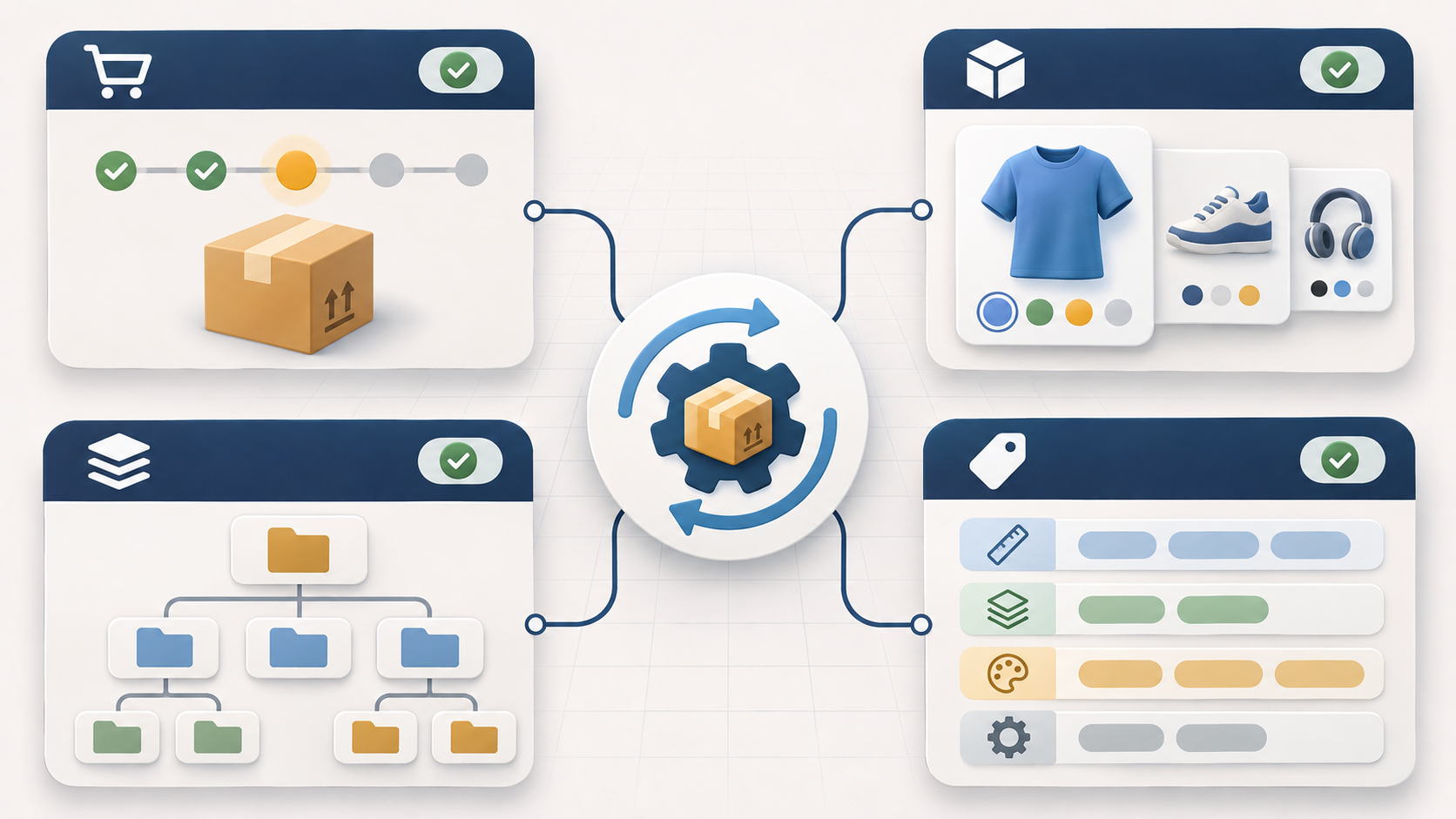
An integration plan should distinguish related data domains. They may belong to the same commercial process, but they do not have the same lifecycle, payload or business meaning. Treating them as one undifferentiated stream usually makes it harder to decide what should trigger an action and what the receiving system should store.
Orders are the operational events that usually require the clearest timing. The receiving system may need to know when an order is paid, processed, completed, cancelled, refunded or otherwise changed. An order connector should define which transitions are relevant, which identifier is stable, what payload is sent and how duplicate or failed deliveries are handled. It should also make clear whether the receiving FileMaker script is expected to look up more information or can process the delivered payload directly.
Products are the records being sold. An order may contain product lines, SKUs and variation data, but that is not automatically the same as synchronising the complete product catalogue. The distinction matters when a product is edited outside an order, when stock or pricing changes, or when a business system needs a full master record rather than a snapshot of a purchased line. A connector that delivers order contents should not be described as a master product-data synchronisation service without separate evidence.
Categories and attributes provide the structure used to describe products. If a category, global attribute or attribute value changes in WooCommerce, the business system may need the event to keep its own classifications aligned. Ignoring this layer can produce inconsistent reports and incomplete downstream records even when orders are delivered correctly. A product may arrive in FileMaker with the right SKU, but still be difficult to group or interpret if the classification vocabulary is out of date.
The architecture should therefore treat these domains as related but independently testable flows. That makes it possible to validate order delivery without assuming that catalogue data or taxonomy changes are already being applied inside FileMaker.
The available approaches to integration
Once the data domains have been identified, the next question is how WooCommerce and FileMaker should exchange information. The available approaches are not equivalent. The classic model gives FileMaker responsibility for everything: at regular intervals, it connects to the website, checks whether anything new has happened and imports the result. This polling model is usually the weakest option for an operational workflow. It introduces a delay between the event and the reaction, repeatedly queries the website even when there is nothing new, increases the load on the two systems and requires complex logic to avoid missing changes or importing the same record twice. It also makes order-status changes and cancellations harder to handle reliably, because the receiving system has to reconstruct what happened by comparing successive readings.
A second approach is Claris Connect, Claris’s cloud-based integration platform. It builds flows from triggers and actions and provides official WooCommerce and Claris FileMaker connectors. The WooCommerce connector can react to events such as new, updated or deleted orders, products and customers, while the FileMaker connector can trigger flows from FileMaker and run scripts or work with records. This is a real integration platform, not simply a generic webhook: it can coordinate steps in both directions and connect several services in one flow.
Its trade-off is architectural. Claris Connect remains an external runtime between WooCommerce and FileMaker. Credentials, mappings, flow history and failures are distributed across three environments, and the project becomes dependent on connector availability, service plans, connector changes and the diagnostic model of the iPaaS. Claris Connect can move data and call actions, but it does not automatically define which system owns each field, how a bidirectional conflict is resolved or what makes a synchronization transactionally complete. When a delivery fails, the operator still has to determine whether the problem is in WooCommerce, the Claris Connect flow or FileMaker.
Other general-purpose iPaaS platforms follow a similar model. Zapier and Make can connect WooCommerce to external services through triggers, actions, webhooks, API calls or custom steps. These platforms can be useful for lightweight automations, but every additional custom step leaves the project responsible for field mapping, authentication, duplicate protection, retries, conflict handling and long-term maintenance.
A third option is to write the integration directly in WordPress and WooCommerce PHP. This can provide a direct route without polling and can be tailored precisely to a particular installation. It also means developing and maintaining every critical part: WooCommerce hooks, authentication, payload mapping, duplicate protection, retries, scheduling, secure settings, logging, capability checks and compatibility with changes in WordPress and WooCommerce. Code that merely sends an HTTP request may appear to work in a first test while still lacking idempotency, failure recovery or a safe response to ambiguous timeouts. The result can be flexible, but responsibility for the entire integration remains with the developer of that specific implementation.
Another approach is to use a dedicated WordPress plugin designed to connect WooCommerce with external business software. Such a plugin can respond to WooCommerce hooks, send structured events through an API and keep the relevant configuration and delivery status close to the system where the events originate.
A modular approach based on plugins
A modular plugin architecture makes those flows easier to understand and maintain. An order connector can own order events, authentication, payload selection and delivery status. A taxonomy connector can own categories, global attributes and attribute values. Each module can expose its own configuration and tests without turning every change into a modification of one large integration. The result is not merely a cleaner codebase; it is a clearer operational contract for the people configuring the system.
This separation improves troubleshooting. If an order reaches FileMaker but a taxonomy event does not, the two cases can be diagnosed independently. The administrator can inspect the relevant connection, script, payload and delivery status instead of searching through a single mechanism that handles unrelated events. New event types or destinations can also be evaluated without changing workflows that are already stable.
Modularity does not remove the need for coordination. The modules still need consistent identifiers, clear ownership of business logic, secure credentials and documented payload expectations. They also need predictable failure behavior. A temporary FileMaker or network problem should be visible and recoverable without silently creating a second record when a retry is attempted.
How PAC approaches the problem
PAC Order Bridge for WooCommerce connects WooCommerce directly to Claris FileMaker Server through the FileMaker Data API. Its documented workflow listens for configured WooCommerce order-status transitions, authenticates with FileMaker, runs the selected FileMaker script and passes a selected value through `script.param`. This allows the FileMaker side to use the WooCommerce order ID as an external key or to receive a richer value when the workflow needs more context.
An important part of this work happens before the script is called. The bridge opens a FileMaker Data API session, retrieves the session token returned by FileMaker, uses it to authorize the script request and closes the session afterwards. This complete session-handling path is part of the PAC bridge rather than something the customer must assemble in FileMaker or in a separate middleware flow. At the time of writing, our review of the official WordPress.org plugin directory found no other available WooCommerce plugin offering this specific FileMaker Data API bridge with explicit session-token handling.
The Professional edition supports status-specific scripts and payload choices, including the order ID, order number, basic JSON, full order JSON or a custom template. Its full order payload can include order fields, addresses, product lines, SKU and variation data, taxes, shipping, fees, coupons, refunds and metadata. That can reduce the need for a second WooCommerce lookup when the FileMaker script needs to process the order snapshot, although the receiving solution still has to decide how to validate and store that information.
The plugin also includes delivery options, duplicate protection, retries and local delivery status. These features address the practical side of integration: an event should not be sent twice merely because a hook ran more than once, and a temporary failure should be visible rather than lost. The FileMaker script remains under the customer’s control. PAC provides the WooCommerce and Data API plumbing, while the business logic continues in FileMaker.
PAC Taxonomy Bridge for WooCommerce addresses a different boundary. It notifies FileMaker when WooCommerce product categories, global attributes or attribute values change. The Free edition uses one FileMaker script and identifies the scope in the parameter. Professional provides separate destinations and scripts for categories, attributes and attribute values, with background delivery, retries and diagnostics. This makes the taxonomy workflow independent from the order workflow while still sending events to the same kind of operational platform.
Together, these two connectors illustrate a practical division of responsibility: order lifecycle events on one side, product classification events on the other. Their role is to notify FileMaker in real time when a covered WooCommerce event occurs. WooCommerce authenticates with the configured FileMaker Server, calls a selected FileMaker script and passes either an identifier or a structured payload through `script.param`; the script then decides how the information should be stored or processed. When a change made in FileMaker also needs to be reflected in WooCommerce, the FileMaker solution can perform that reverse operation through the WooCommerce REST API, applying its own business rules and credentials. This division is deliberate: the PAC bridges handle the WooCommerce-to-FileMaker event path, while FileMaker remains responsible for any call back to WooCommerce. Product data carried inside an order payload should therefore be described as order context, not as proof that every product create, update or deletion is synchronized to FileMaker.
Conclusion
Connecting Claris FileMaker and WooCommerce is not about copying every piece of data into both systems. It is about giving each platform a clear responsibility and a reliable way to exchange events. PAC Bridge plugins provide the real-time WooCommerce-to-FileMaker path, while FileMaker remains responsible for applying business logic and, when necessary, calling WooCommerce through its REST API. This division keeps the integration modular and adaptable to the company’s actual processes.